Is your computer feeling sluggish? Are you experiencing annoying bugs and glitches? Older drivers may be to blame. drivermax 16 is here to the rescue, offering a faster, more stable and powerful way to keep your drivers updated.
DriverMax 16 Pro Giveaway:
Before considering this offer, take a moment to look at the details below instead of jumping straight to the gift page.
This offer is for these users GermanyAustria and Switzerland. Make sure you have a German IP or use a VPN set up in a German location to get your license code.
After installing and activating DriverMax, run a VPN for driver updates. Without it, you may receive a notification stating that the free version is not for your country, which may lead to subscription removal.
i used Windscribe VPN On your Windows 11 PC to test the promo (see screenshot). It worked well, giving me 367 days of subscription and easily updating all the old drivers at once.
tip: ProtonVPN (Free) or tunnelbear vpn [Free] These are also viable options, requiring no sign-up.
Follow these simple steps to get your license code.
Update: [New Giveaway ]
Open your VPN, select Germany as your virtual location and proceed to New gift page.
Note: The page is in German, so use google translator.
Fill out a short form by providing your first name, last name and email address. Then, agree to the terms and conditions on the gift page, solve the reCAPTCHA and finally, click “Submit”.
Please check your email inbox for messages from SoftwareZirgel (register@softwarezirgel.de). This email provides the license code.
Download the installer here https://drivermax.de/soft/
[Previous Giveaway Still Working]
step 1:
Launch your VPN, select Germany as your virtual location and go to gift page (Preferably in incognito mode).
step 2:
Provide your first name, last name, email address, complete the captcha, and press the “Submit” button.
Pay attention to the “Thank you” message (Thank you very much for your registration).
step 3:
Check your email inbox for messages from Softwarezirkel (register@softwarezirkel.de). This email contains activation information (userid and registration code).
If you see the code: DMX-COUNTRY-NOT-ALLOWED, there may be an issue with your VPN.
step 4:
download software from https://drivermax.de/soft/
Step 5:
Turn on your VPN, install the software, and launch the app.
Step 6:
In Settings, click “Register”, then click ‘Next’ and select the “Enter Registration Code” link.
Step 7:
Enter the license or registered code, click “OK” and complete the registration by entering your email and setting a password (enter twice).

. You now have 1 year free membership. Remember, whenever you use DriverMax, launch the VPN (set to German country) and close the app after updating the drivers.
Also, disable the app from starting from Windows (Task Manager->Startup) to avoid losing subscription.
You can also use the “Startup Optimizer” module Advanced SystemCare 17 To manage app startup preferences.
About this DriverMax 16:
Discover the power of DriverMax 16 – a user-friendly software that makes it easy to update, backup and restore drivers. Your all-in-one solution to keep your PC healthy and performing at its best.
More updates than ever
DriverMax 16 boasts a massive driver database, ensuring you have access to the latest updates for all your hardware, including:
- graphics card
- sound card
- network adapters
- usb device
- printer
This comprehensive coverage ensures your protection PC Runs at its peak performance, maximizing your gaming, multimedia and workflow experiences.

Automated installs and scheduled scans
Forget manual driver installation. DriverMax offers automatic installs, scheduled scans, and full backups device driver. Set it to check for updates and download them at your preferred time, whether that’s day, week, or month.
Adaptability and Productivity
DriverMax is compatible with all recent versions of Windows, including 32-bit and 64-bit versions of Windows 11, Windows 10, Windows 8, Windows 7, Windows Vista, and Windows XP. By providing you with the best late productivity.
Intelligent self-learning technology
DriverMax goes beyond simple driver updates. It is a smart system that analyzes your current drivers and provides the latest versions for over 2,300,000 devices. Its unique online self-learning technology ensures that only the most appropriate and latest versions are installed.
Maximum security for your updates
This takes the hassle out of updating Windows software security. It tests every new driver before installation to guarantee proper functionality on your PC.
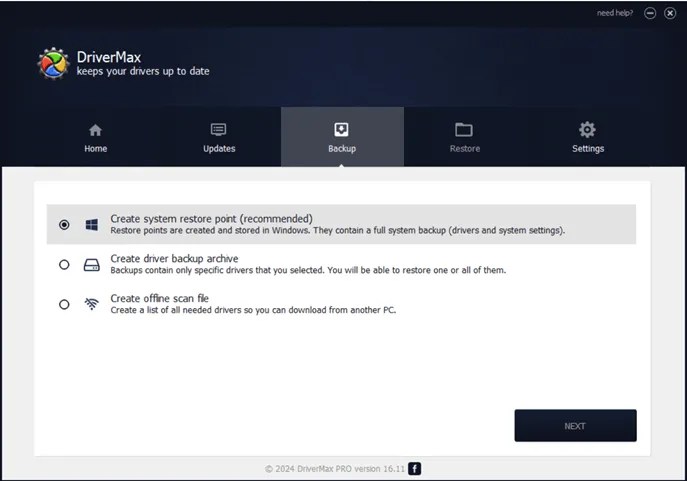
Additionally, it backs up current drivers and creates a system restore point for fast rollback if necessary. All drivers undergo thorough virus and threat checks before making them available to users.
conclusion
DriverMax 16 goes much further than a simple driver updater. It is a complete solution that manages all your PC driver needs while ensuring peak productivity and security.
With automatic installs, smart self-learning technology and top-of-the-line security, DriverMax is the ultimate solution for your computer.
Connected
Learn more from Techno360
Subscribe to get the latest posts delivered to your email.

![Wise Registry Cleaner Pro v11 Free for 1 Year [Worth $29.95] | Free Download](https://freedownload.co.in/wp-content/uploads/2024/06/Wise-Registry-Cleaner-Pro-Box.png?v=1719554291)