SoftOrbits AI Photo Editor is a simple Windows tool that allows you to change and customize the look of photos, remove blemishes, add text watermarks, and crop them. A one-year license of this program, priced at $24, is currently available for free for a short period.
About SoftOrbits AI Photo Editor:
with this photo editorYou can easily modify the look of your photos with its user-friendly interface. It comes with many useful features that let you get business results instantly.
The user interface of the app is easy to navigate, even for those who are not tech-savvy.

The main window of SoftOrbits AI Photo Editor lets you open the file you want to edit, while the ribbon gives you access to a “toolbox”, where you can add various components to your photos. To get started, open the image file in the software.
The software supports the following formats: JPG, BMP, PNG, GIFTIF, TGA, PSD, PCX and WMF, ensuring that no compatibility issues arise.
Next, on the ribbon of the SoftOrbits photo editor, you will see several tools that you can select from. These include “Crop,” “Rotate,” “Extract,” “Text,” “Image Correction,” and “Resize,” all of which have easily customizable features.
The ‘Crop’ tool allows you to choose to remove unwanted parts of the image, while the ‘Rotate’ tool allows you to tilt it to your liking. Use the ‘Remove’ tool to select an area of your photo to erase, but this works best with smaller things.
Additionally, the ‘Image Correction’ tools provide options to adjust brightness, contrast, saturation, temperature, hue and gamma, as well as soften or sharpen images, and they also allow you to add a copyright-protecting watermark using the ‘Text’ function. Use the “Resize” tool to adjust the file’s dimensions in pixels or percentages.

SoftOrbits Photo Editor aims to help you enhance the appearance of your favorite photos without needing to learn to operate complex software just to make minor adjustments. The app is intuitive and easy to use.
Official webpage: https://www.softorbits.net/
SoftOrbits AI Photo Editor Giveaway:
Visit this gift page: https://www.softorbits.net/actions/getfreekey.html
Enter your email address and click the “Request full version license key” button.

Next, fill out a small form with your first and last name, select your country and click the “Done” button.
The giveaway page will display a license key. Copy the code.
download software from https://download.softorbits.com/
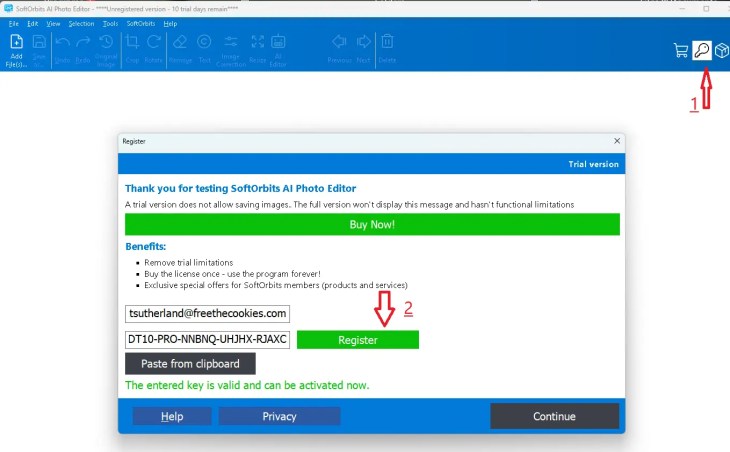
Install the software, start the app, and in the main window, click the “Key” icon, then input your email address and the license code you received, and finally press the “Register” button.
Learn more from Techno360
Subscribe to get the latest posts delivered to your email.


![Wise Registry Cleaner Pro v11 Free for 1 Year [Worth $29.95] | Free Download](https://freedownload.co.in/wp-content/uploads/2024/06/Wise-Registry-Cleaner-Pro-Box.png?v=1719554291)