Hands-on review · Windows 11 · Tested Oct 2026
A huge 8K wallpaper library, an AI image maker and live wallpapers in one app. The free version, though, has a serious ad problem.
I spent time with backiee (the app many of you still know as Wallpaper Studio 10) to find out which features are free, which ones sit behind Premium, and whether the ads are a deal-breaker.
💰 Free + in-app purchases
🖥️ Windows 10 / 11
🧪 Version 13.14.385.0
⭐ Our score: 7.5/10
⚡ Quick Read
- What it is: a Microsoft Store wallpaper app with 4K, 5K and 8K images, slideshows, live wallpapers, widgets and an AI generator.
- Free: browsing, downloading and setting wallpapers. No account needed.
- Paid: live wallpapers, widgets and weather/time/season slideshows need Premium. AI images use credits.
- The catch: the free version has a lot of ads, including full-screen ones that cover the whole app.
- Who should get it: anyone who changes wallpapers often and likes a curated library. Light users can stay free and put up with the ads.
I change my desktop wallpaper more often than I’d like to admit. Most of the time that means opening a browser, typing “4K wallpaper”, and wading through sites full of fake download buttons. So when backiee kept showing up among the popular personalization apps in the Microsoft Store, I installed it on my Windows 11 PC to see if it could replace that routine.
Short version: the wallpaper side is very good, and there’s more here than I expected. But the free experience comes with a level of advertising that can interrupt normal browsing, and that changes who I’d recommend it to.
🧪 How I tested: backiee version 13.14.385.0 installed from the Microsoft Store on Windows 11, used on the free plan without buying Premium or credits. Anything I couldn’t check myself (like how Premium features behave after you pay) is based on backiee’s own Store listing and FAQ, and I say so where it matters. Prices are what the app showed me in India in October 2026.
What Is backiee?
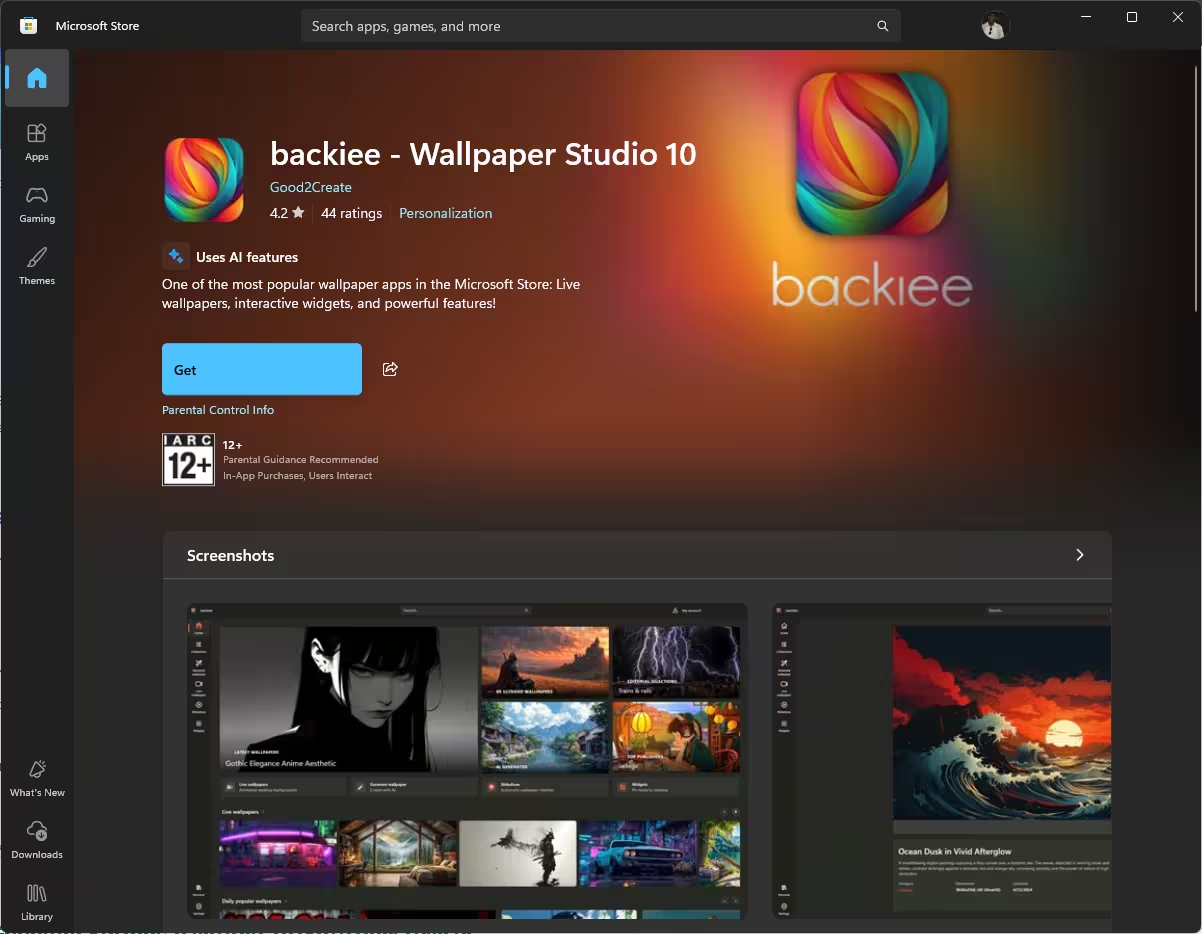
backiee is the Windows app for the backiee.com wallpaper site, published in the Microsoft Store as backiee – Wallpaper Studio 10 by Good2Create. If you used Wallpaper Studio 10 years ago, this is the same app, rebranded and grown up a lot. It’s filed under Personalization, carries an IARC 12+ rating, shows the “Uses AI features” label and mentions in-app purchases right on the listing.
The download was small, around 49 MB in my case, and it installed in under a minute. backiee also has apps for Android and iPhone, and the Store listing says your wallpapers can sync across Windows, Android, iPhone and Xbox if you sign in.
backiee Features at a Glance: Free vs Premium
This was the first thing I wanted to know, and the app doesn’t make it obvious until you hit a paywall. Here’s what I found:
The Wallpaper Library: Where backiee Really Shines
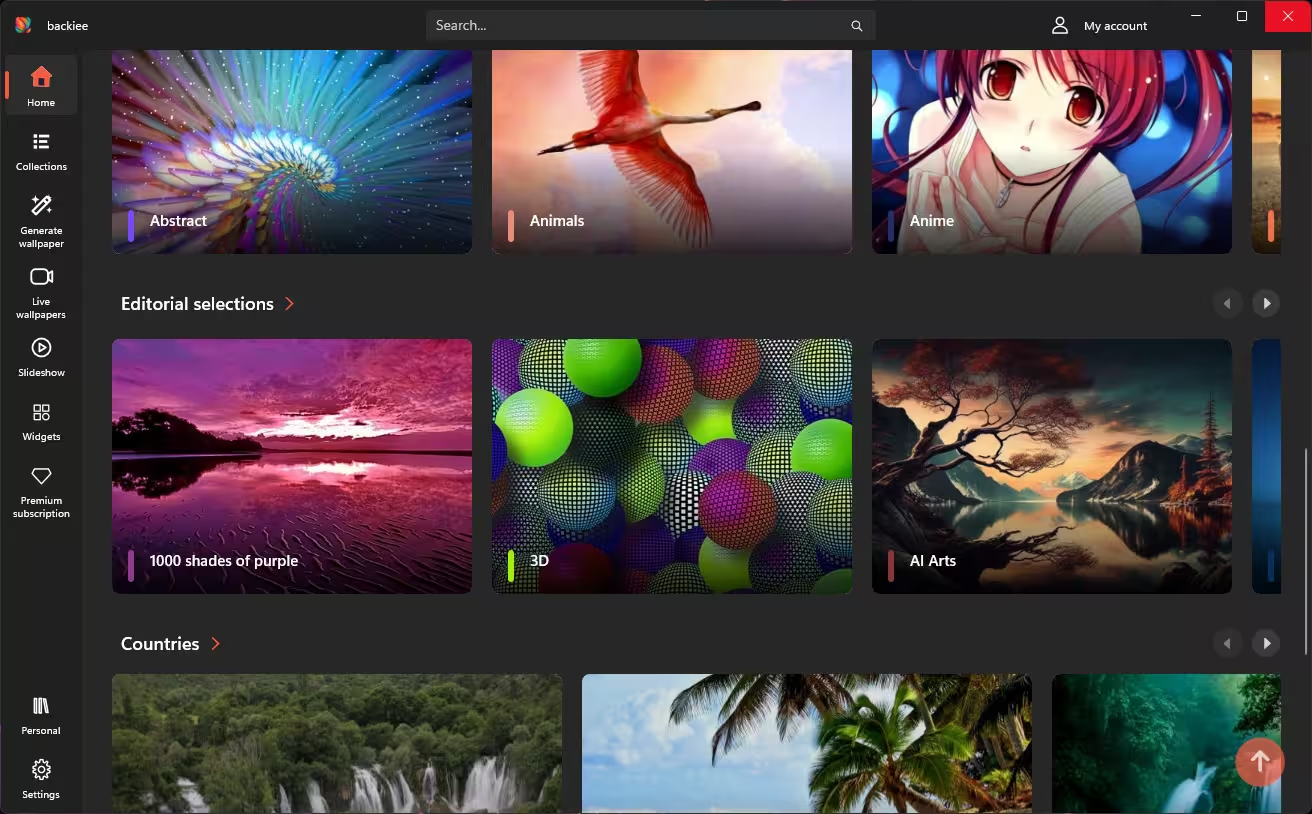
Open the app and you land on a dark home screen packed with big thumbnails: Abstract, Animals, Anime, Editorial selections, Countries and more. It feels more like browsing a streaming service than a download folder, and the images are well chosen. I scrolled for a good while before I found anything that looked low-effort.
4K, 5K and 8K wallpapers
backiee offers wallpapers in 4K, 5K and 8K, and there’s a separate Resolutions section so you can go straight to the size your screen needs. If you’re on a 1440p or 4K monitor, this matters more than you’d think. A lot of “HD wallpaper” sites quietly serve images that look soft once they’re stretched across a big display.
Nine ways to browse
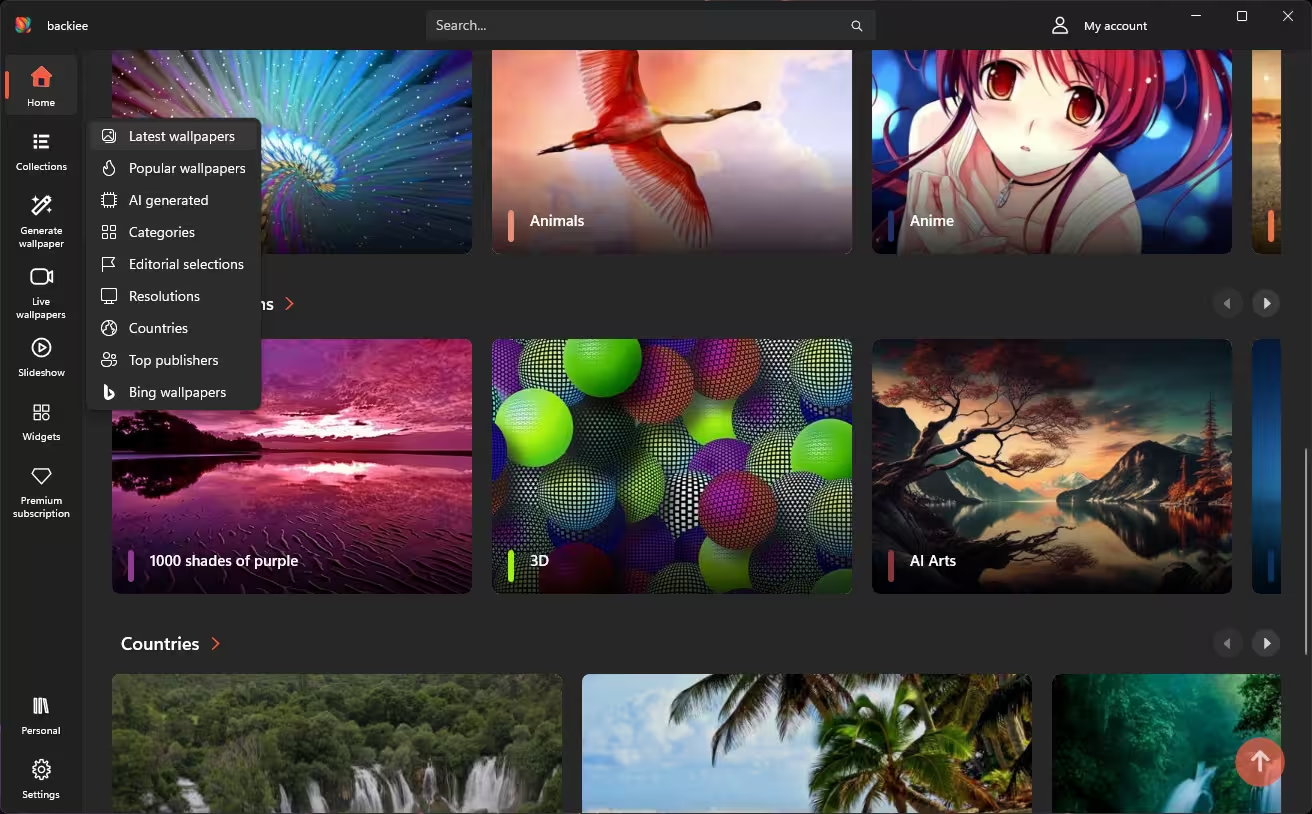
Hover over Collections in the sidebar and you get nine entry points: Latest, Popular, AI generated, Categories, Editorial selections, Resolutions, Countries, Top publishers and Bing wallpapers. The Bing section is a nice extra if you like the daily Bing images but don’t want Bing setting your desktop. The Countries section is great for landscape photos, and Top publishers lets you follow the people uploading the work you like.
Inside a category you get a Filter button and a Set as slideshow button, so you can turn a whole category into a rotating background with one click. Setting a single wallpaper is just as easy: open it, hit Set, confirm. If you’re signed in, the same dialog lets you push the wallpaper to all your devices.
Favorites, folders and the Personal tab
Browsing and downloading work without an account. Sign in, though, and the Personal tab becomes useful: you can like wallpapers, sort them into folders, look back at your wallpaper history and follow the latest uploads from your favourite artists. All of that syncs across devices. If you’ve ever found a perfect wallpaper and lost it a week later, this alone is a good reason to make an account.
📝 Licensing note: backiee’s FAQ says its wallpapers are for personal use as device backgrounds. Using them in YouTube thumbnails, client work or anything you sell isn’t allowed without the creator’s permission.
The Biggest Problem: Ads in the Free Version
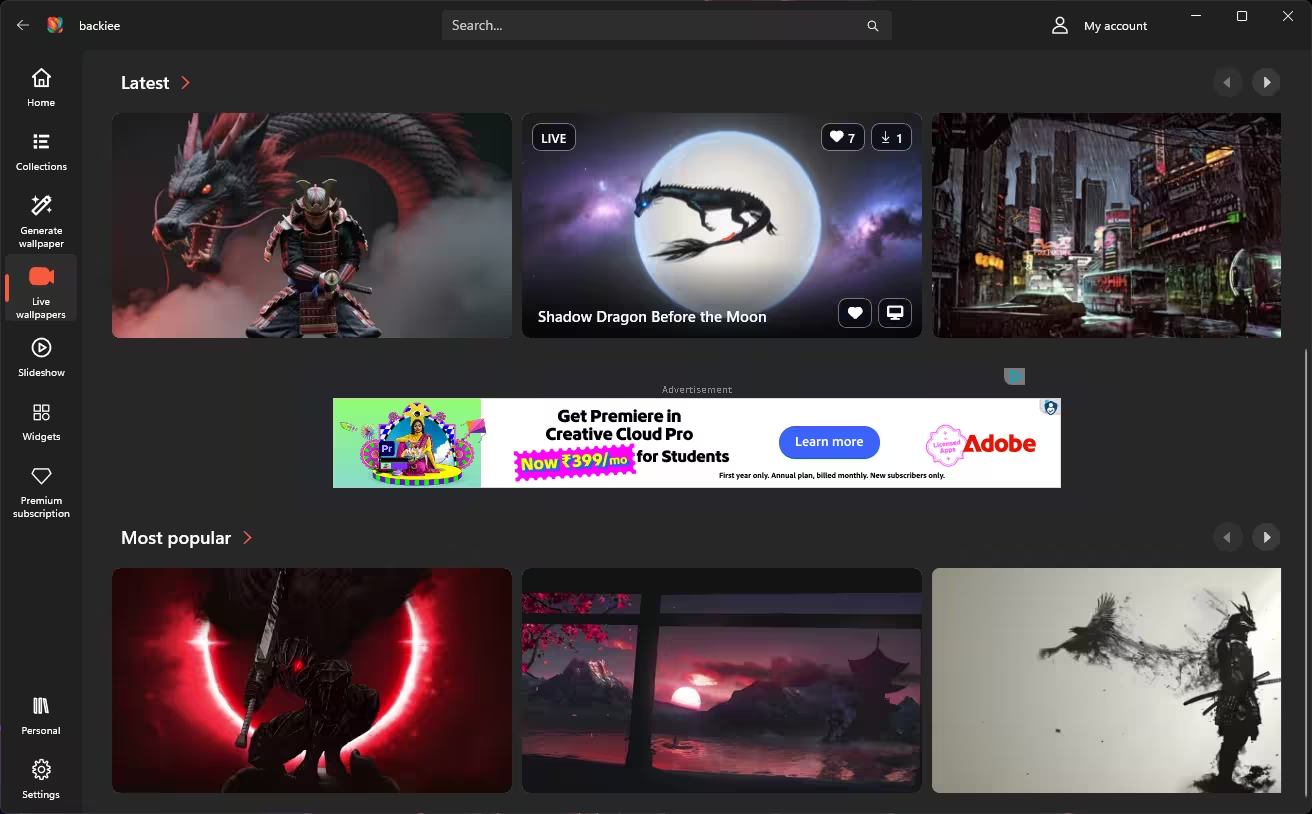
I’ll be blunt. Within the first few minutes I’d come across several ads: banner ads tucked between the wallpaper rows as I scrolled, and full-screen ads that covered the whole interface when I switched tabs. Each one has a Close ad button, but sometimes only after waiting a few seconds.
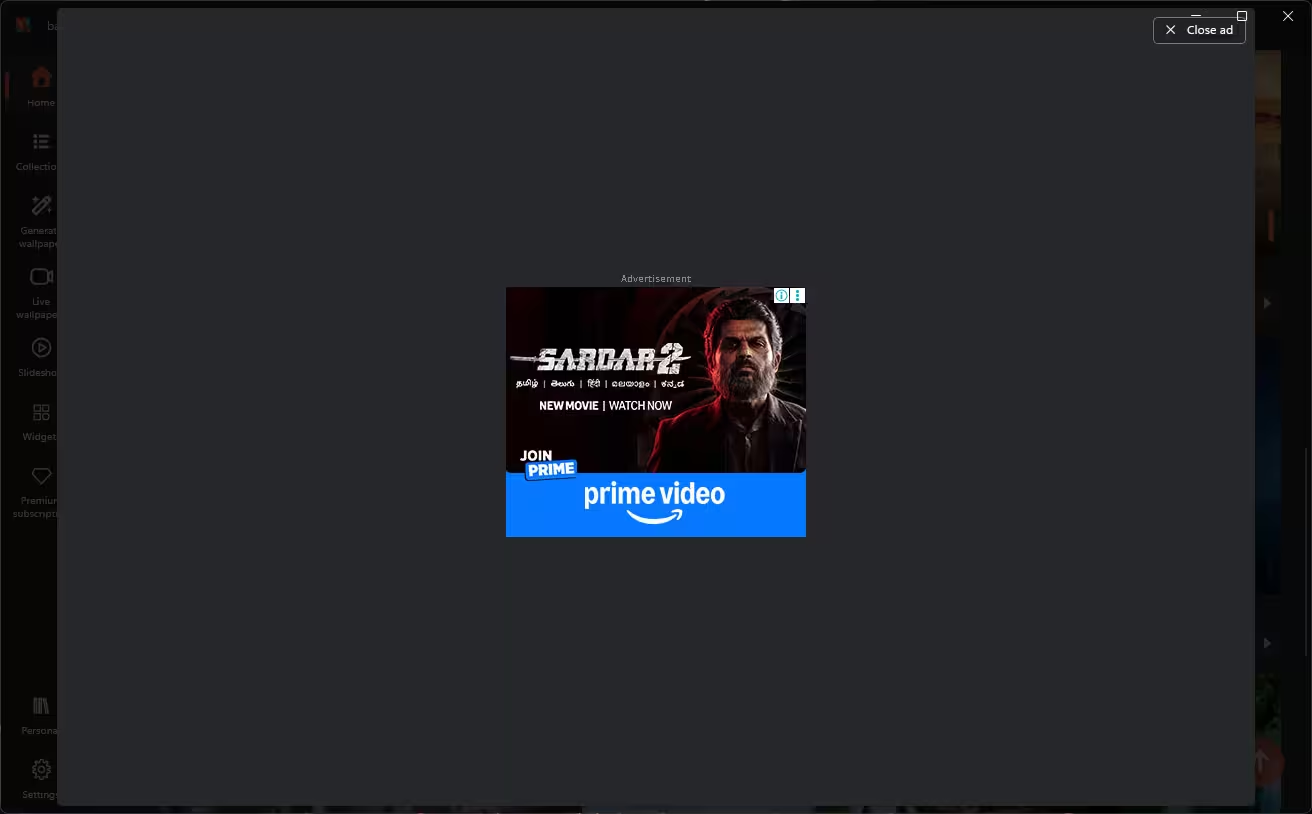
backiee doesn’t hide this. Its FAQ says free users see ads and Premium removes them. That’s understandable for a free service, but the full-screen ads hurt the main thing the app is good at, which is relaxed browsing. If you open the app twice a month to grab a new background, you’ll live with it. If you browse daily, it gets old fast.
Live Wallpapers
The Live wallpapers tab has Latest and Most popular rows, heavy on anime, samurai, dragons and neon city scenes. Each card shows likes and download counts, and there’s a quick button to set it on your desktop. You can browse and preview them on the free plan, but actually using live wallpapers is a Premium feature.
Does backiee affect Windows performance?
I tested on the free plan, which can’t run live wallpapers, so I didn’t benchmark them and I won’t guess CPU or GPU numbers. backiee’s own FAQ says live wallpapers use GPU and memory, that the impact is small on most modern PCs, and that it depends on your hardware and the video you pick. Static wallpapers and the regular slideshow just change your background image, so they’re not the part to worry about. On a laptop running on battery, any animated background will cost you some battery life.
If live wallpapers are the main thing you want and you’d rather not pay, I’ve covered Lively Wallpaper, a free and open-source live wallpaper app for Windows. It doesn’t have backiee’s library, but it doesn’t charge for animation either.
Slideshows and the Interactive Slideshow
The Slideshow page is laid out per monitor, with a separate section for the lock screen, so a dual-monitor setup can rotate different wallpapers on each screen. The regular slideshow page opened without any paywall.
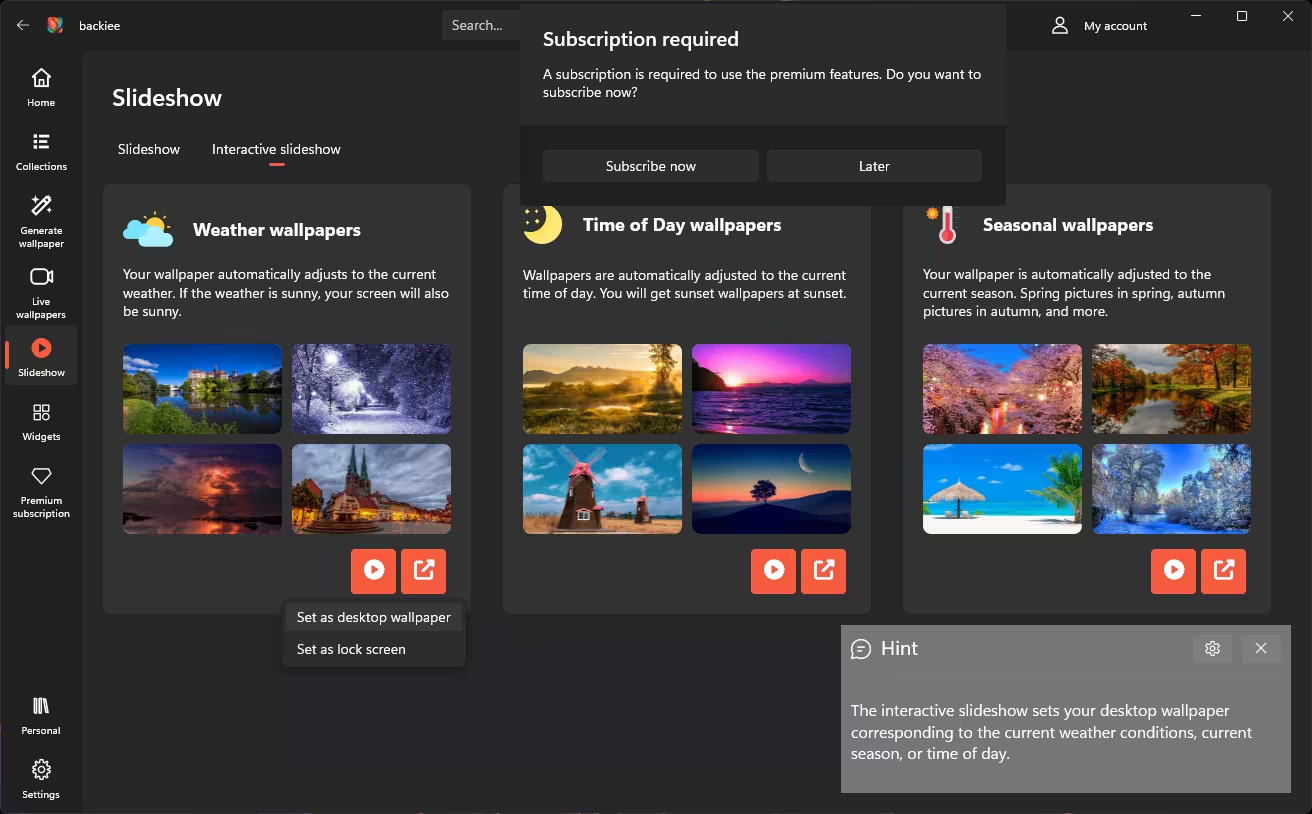
The Interactive slideshow tab is the clever bit. It has three modes:
- Weather wallpapers: sunny outside, sunny desktop. Storm outside, storm on screen.
- Time of Day wallpapers: sunrise images in the morning, sunsets in the evening.
- Seasonal wallpapers: blossoms in spring, falling leaves in autumn.
You can set any of them for the desktop or the lock screen. As soon as I clicked play, though, a “Subscription required” box popped up. This is Premium only.
AI Wallpaper Generator: Fun, but It Runs on Credits
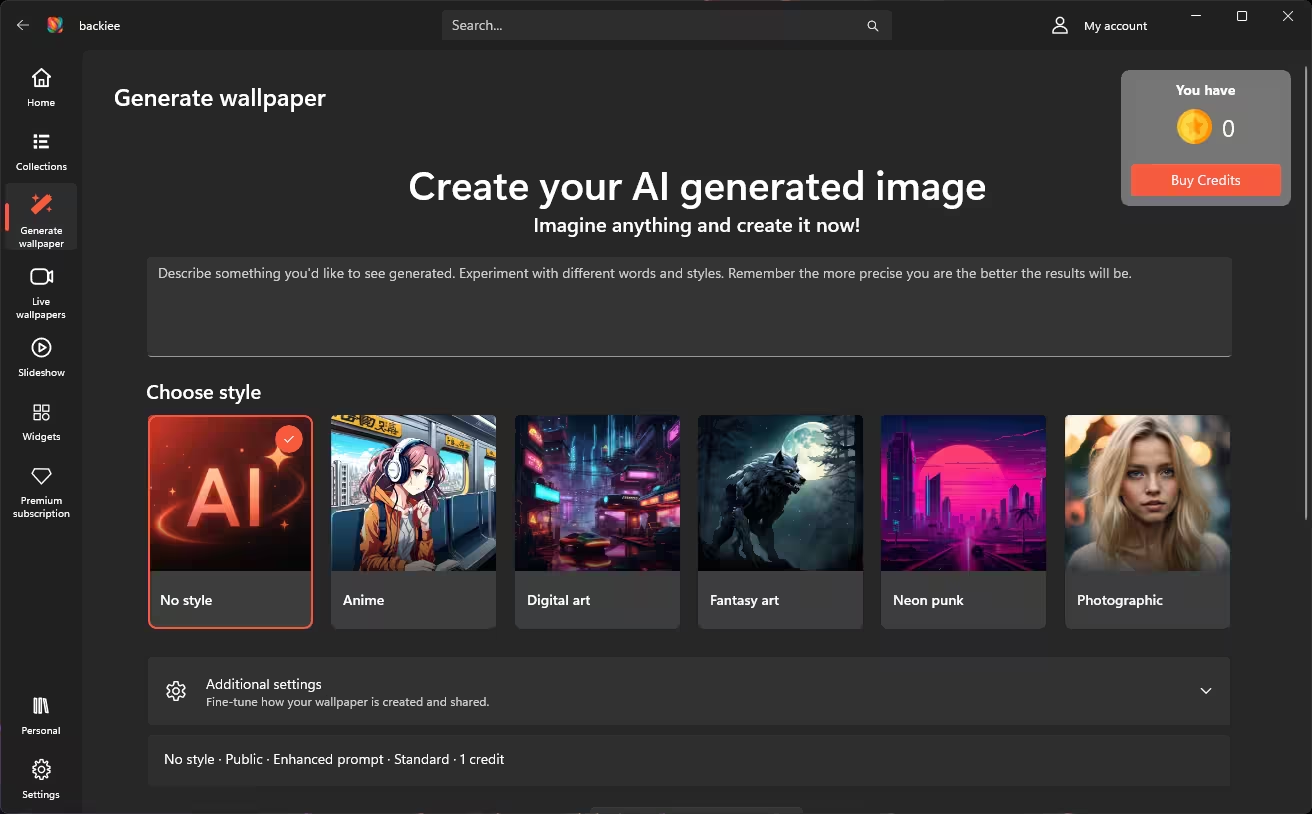
The Generate wallpaper tab lets you type a description and pick a style: No style, Anime, Digital art, Fantasy art, Neon punk or Photographic. Under Additional settings you can choose whether your image is public, turn on prompt enhancement and pick the quality level.
Here’s the part people miss: generation isn’t free. A standard image costs 1 credit, and my balance started at zero, with a Buy Credits button right next to it. So think of backiee as a free wallpaper app with a paid AI add-on, not a free AI wallpaper generator. If daily AI-made wallpapers are what you’re after, you might also like WallpaperOS, which drops a fresh AI wallpaper on your desktop every day.
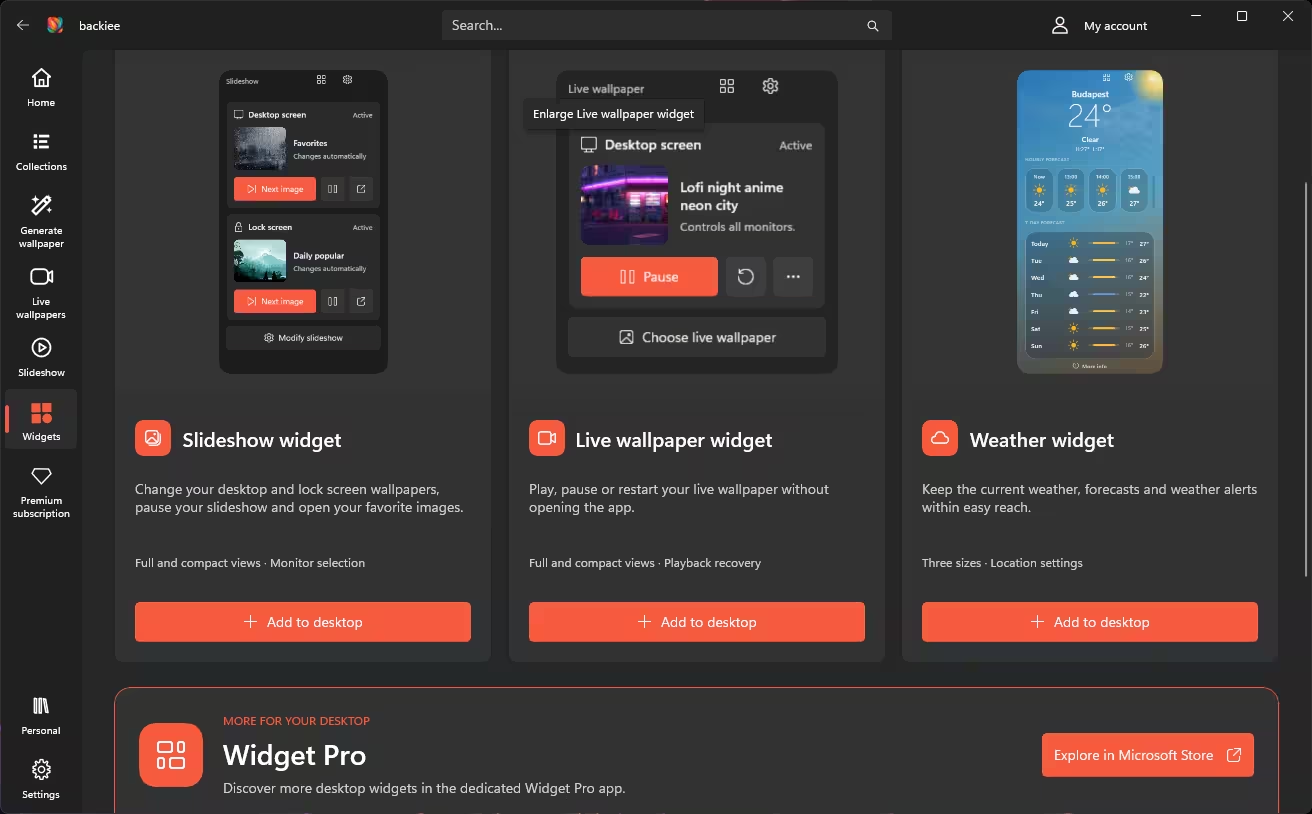
Desktop Widgets
backiee comes with three widgets you can pin to the desktop:
- Slideshow widget: skip to the next image, pause, or open the current one, for both desktop and lock screen.
- Live wallpaper widget: play, pause or restart the animation without opening the app.
- Weather widget: current conditions, hourly and 7-day forecast, in three sizes.
They look clean and match Windows 11 well, but they’re part of Premium. The page also pushes Widget Pro, a separate app from the same developer. If you want handy info on Windows 11 without paying, WidBar puts free widgets right on your taskbar.
backiee Premium: Price and Is It Worth It?
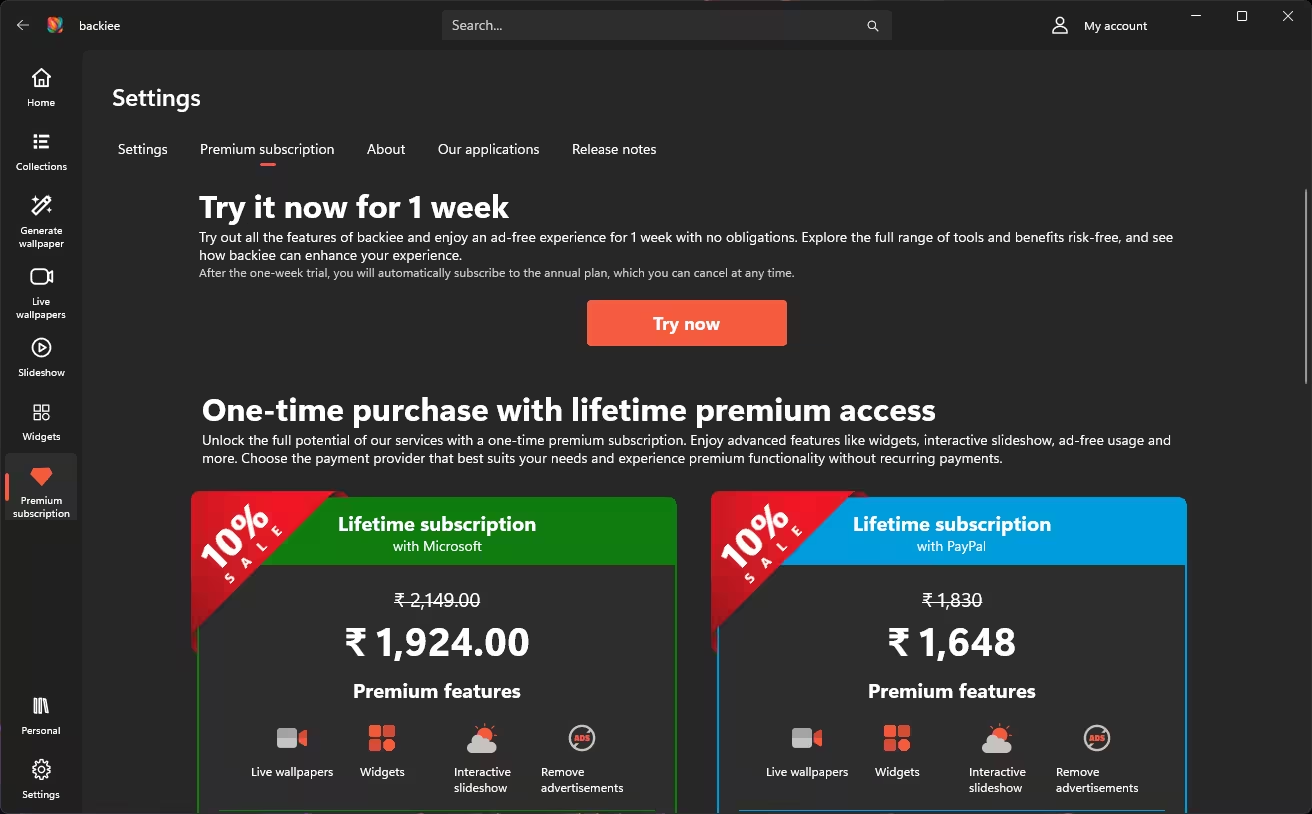
When I tested it, backiee offered three ways in:
- 1-week free trial: full Premium with no ads for seven days (see the warning below).
- Lifetime via Microsoft: ₹1,924 (shown down from ₹2,149).
- Lifetime via PayPal: ₹1,648 (shown down from ₹1,830).
⚠️ Trial warning: the one-week trial shown in the app turns into an annual plan automatically unless you cancel before it ends.
Prices checked in India in October 2026, at the time of writing. They differ by country, the sale shown in the app won’t last forever and the developer can change them without notice, so check inside the app before you pay. When I looked, PayPal was about ₹276 cheaper than paying through Microsoft for the same lifetime licence.
In the US or UK? The US Microsoft Store listing doesn’t show in-app prices, and I couldn’t check US pricing inside the app from India. Softpedia’s download page lists a backiee Premium subscription at $22.49 (down from $24.99), but it doesn’t say whether that’s the lifetime or annual plan. Treat it as a rough guide and check the Premium page in the app for the price in your currency.
👍 Buy Premium if you…
- want live wallpapers inside the same app
- like the weather/time/season slideshows
- want the desktop widgets
- open the app often and the ads drive you mad
👎 Skip it if you…
- just grab a new wallpaper now and then
- are happy with static images
- already use a free live wallpaper tool
- can put up with ads for a few minutes a month
How to Install backiee and Set Your First Wallpaper
- Open the backiee page in the Microsoft Store and click Get.
- Launch it from the Start menu. You can skip signing in for now.
- Go to Collections → Resolutions and pick the one that matches your screen.
- Open a wallpaper you like and click Set, then confirm. Use Save if you want the file on your PC.
- Want variety? Open any category and hit Set as slideshow.
For more ways to make your PC look and work the way you want, browse our Windows apps, tweaks and guides hub.
backiee Pros and Cons
👍 What I liked
- Large, well-curated library with 4K, 5K and 8K options
- Nine smart ways to browse, including Bing wallpapers
- No account needed to download
- Per-monitor and lock screen slideshows
- Folders, history and cross-device sync
- Lifetime Premium option, not just a subscription
👎 What bugged me
- Heavy ads, including full-screen interruptions
- Live wallpapers, widgets and smart slideshows are paid
- AI images need purchased credits
- Free trial converts to an annual plan automatically
- Wallpapers are for personal use only
📊 Techno360 Verdict
7.5/10: Great wallpapers, too many ads
As a place to find high-resolution wallpapers, backiee is one of the best options I’ve used on Windows. The library is big and well sorted, the resolution filter actually helps, and per-monitor slideshows are something Windows still doesn’t do well by itself.
The free version, though, leans hard on ads, and several of the features beyond static wallpapers cost money, including live wallpapers, widgets and the interactive slideshow. My advice: install it free, use it for a week, and only buy the lifetime licence (PayPal was cheaper for me) if you find yourself opening it every few days. If you start the trial, set a reminder to cancel before it turns into an annual plan.
✅ Recommended for: Windows users who change wallpapers often and want a large, curated library in one app.
❌ Not for: people who only want the odd free wallpaper, or who can’t stand in-app ads.
Library: 9/10
Features: 8/10
Free experience: 5/10
Value: 7.5/10
FAQ
Is backiee free to use?
Yes. You can install backiee from the Microsoft Store and browse, download and set wallpapers for free. The free version shows ads. Live wallpapers, widgets and the interactive slideshow need Premium, and AI wallpaper generation uses credits.
Do I need an account to use backiee?
No account is needed to browse and download wallpapers. You need to sign in for favorites, folders, history and syncing a wallpaper across your devices.
Does backiee have 4K, 5K and 8K wallpapers?
Yes. backiee offers wallpapers in 4K, 5K and 8K, and the app has a Resolutions section so you can browse by resolution.
Are backiee live wallpapers free?
No. Live wallpapers are listed as a Premium feature. If you only want free animated wallpapers on Windows, the open-source Lively Wallpaper app is an alternative.
How does the backiee AI wallpaper generator work?
You type a prompt, pick a style such as Anime, Digital art, Fantasy art, Neon punk or Photographic, and generate. Each generation uses credits; a standard image cost 1 credit in my test, and my balance showed 0 credits when I tried it.
Is backiee Premium worth it?
It is worth it if you want live wallpapers, desktop widgets, weather or time-based slideshows and an ad-free app. If you only grab a wallpaper now and then, the free version is enough.
Can I use backiee wallpapers commercially?
No. backiee says its wallpapers are for personal use as device backgrounds. Redistribution, resale or commercial use is not allowed without permission.
Official links: backiee.com · backiee on Microsoft Store