🎁 Giveaway · Installed & tested on Windows 11 · 25 Oct 2026
A locked-down browser for online banking that only opens sites you trust, now with a full 2027 redesign
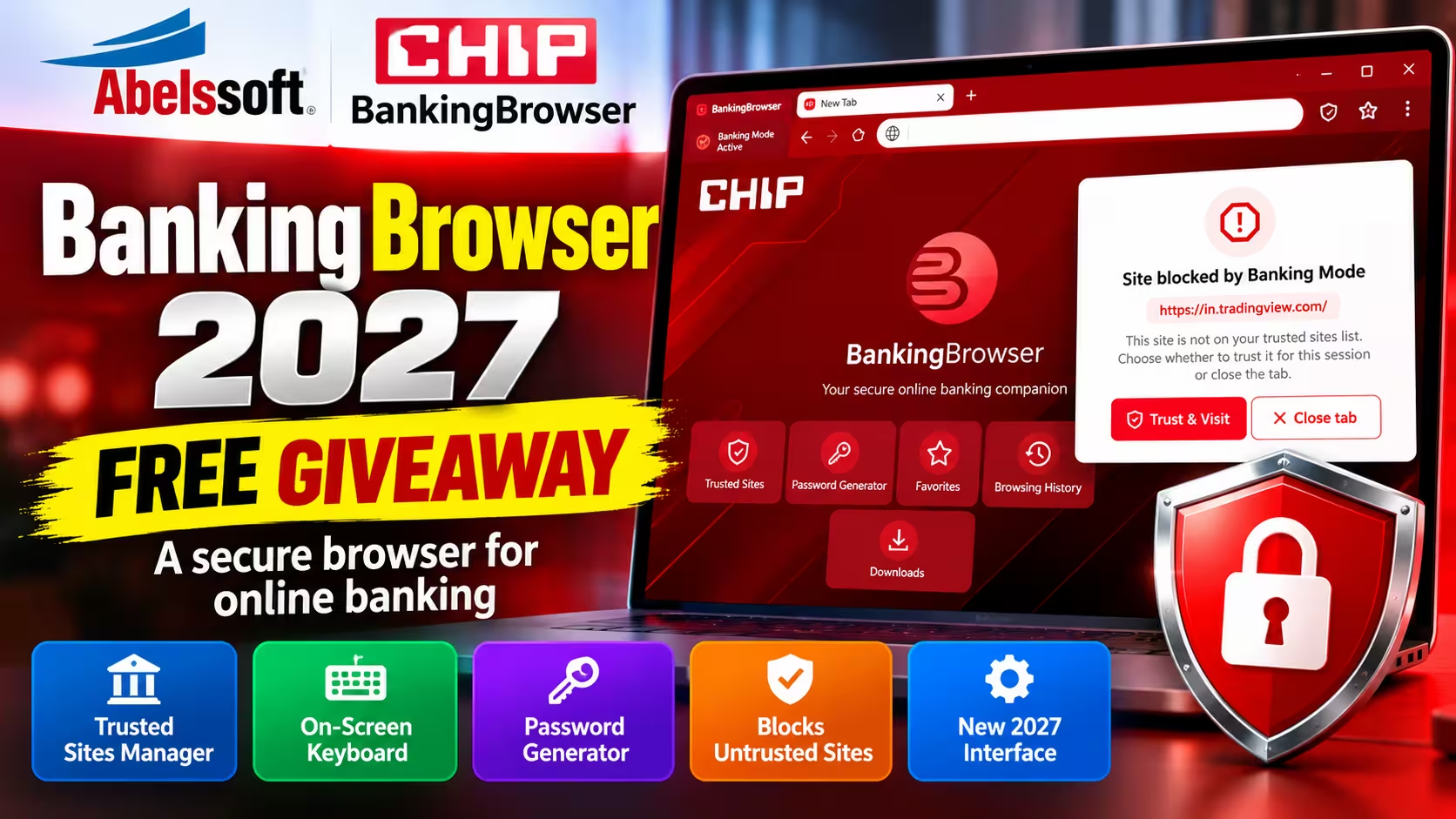
The 2027 giveaway build ships as CHIP BankingBrowser, the CHIP-branded edition of Abelssoft BankingBrowser 2027. It has a new interface, a trusted-sites manager, an on-screen keyboard and a password generator. Grab the full version free with the installer below.
⚡ Quick Read
- What: A Windows browser built only for online banking. In Banking Mode it blocks every site that isn’t on your trusted list.
- New in 2027: a redesigned interface, a start tab with every tool on it, a three-dot menu for settings, a guided tour and automatic updates.
- Tools: trusted-sites manager, on-screen keyboard, password generator, favourites, history and downloads.
- Indian users: the built-in bank list covers German banks, so add your own bank (SBI, HDFC, ICICI and so on) manually.
- Runs on: Windows 10 and 11. The giveaway installer is 8.3 MB and hosted by Techno360.
What Is BankingBrowser 2027?
BankingBrowser is a dedicated browser from German developer Abelssoft for online banking and other money tasks. It doesn’t try to replace Chrome or Edge. You open it only when you log in to your bank, and in its default Banking Mode it refuses to load any website that isn’t on your trusted list. So if a phishing email or SMS links to a look-alike bank domain, you get a block screen instead of the fake page, unless you approve that domain yourself.
German tech magazine CHIP has offered BankingBrowser to its readers for several years. For 2027, Abelssoft and CHIP gave the program a completely new look. The giveaway build we’re hosting is that CHIP edition. The window title, start page and installer all say CHIP BankingBrowser, but it’s Abelssoft’s program: the About page reads “CHIP BankingBrowser © Abelssoft”, and Windows shows the installer’s verified publisher as Ascora GmbH, the company behind Abelssoft.
Giveaway Details at a Glance
| Item | Details |
|---|---|
| Software | CHIP BankingBrowser 2027 (CHIP edition of Abelssoft BankingBrowser 2027) |
| Version tested | 9.03 (Core 13.6, Build 75693) |
| Developer | Abelssoft (verified publisher: Ascora GmbH) |
| Licence | Giveaway full version, unlocked with a free email registration (licence duration and upgrade rights not stated) |
| Operating systems (per CHIP) | Windows 10, 11 |
| Installer | 8.3 MB, hosted by Techno360 |
| Tested on | Windows 11, 25 October 2026 |
Version note: This review covers the CHIP BankingBrowser giveaway build we installed and tested. Its version and update status may differ from newer releases available from Abelssoft. Check the version shown in Settings → About before relying on the version details in this article.
How to Get BankingBrowser 2027 Free
🎁 Download Giveaway Installer (8.3 MB)
Installer hosted by Techno360 · Windows shows the verified publisher as Ascora GmbH · New Abelssoft users need a free email registration to activate it
- Download BankingBrowser_setup.exe using the button above.
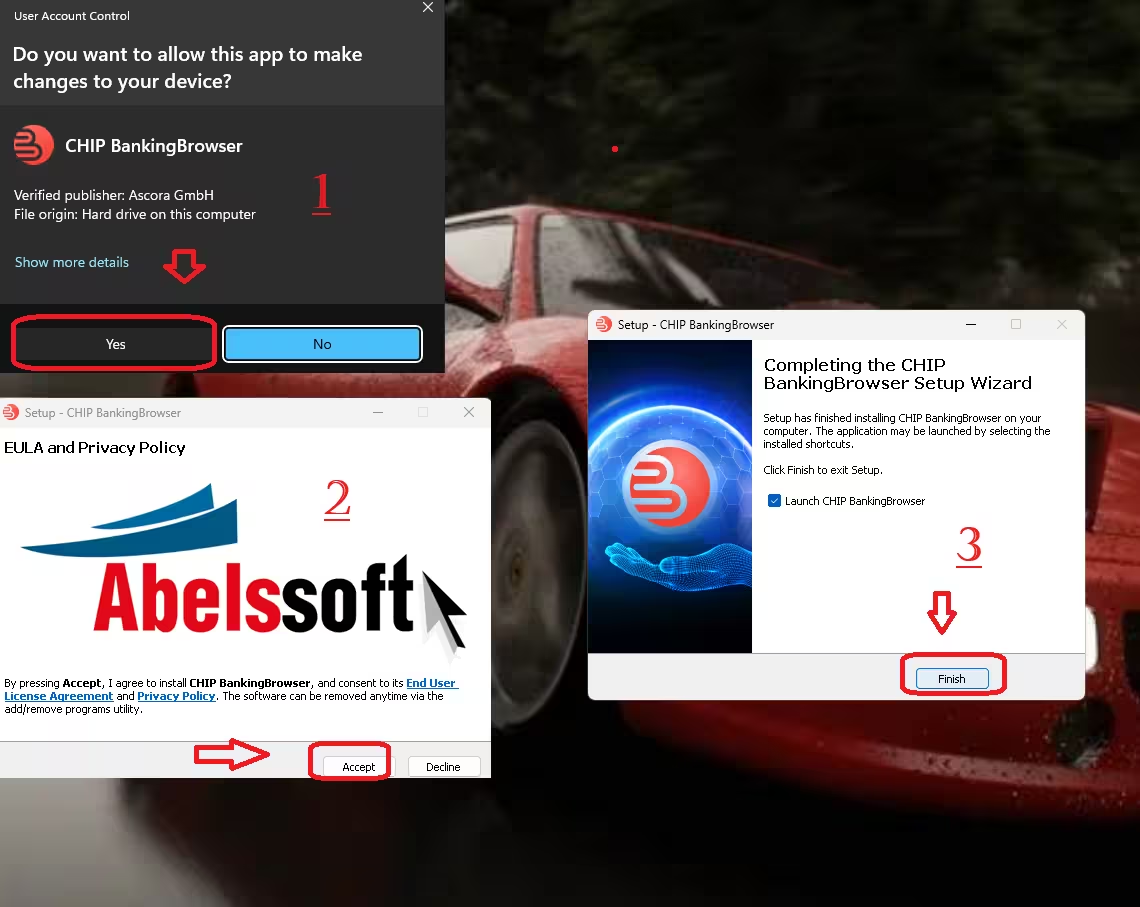
- Run the installer. When Windows asks for permission, check that it shows CHIP BankingBrowser with the verified publisher Ascora GmbH, then click Yes.
- Click Accept on the EULA and Privacy Policy screen. Setup installs straight away.
- Leave Launch CHIP BankingBrowser ticked and click Finish.
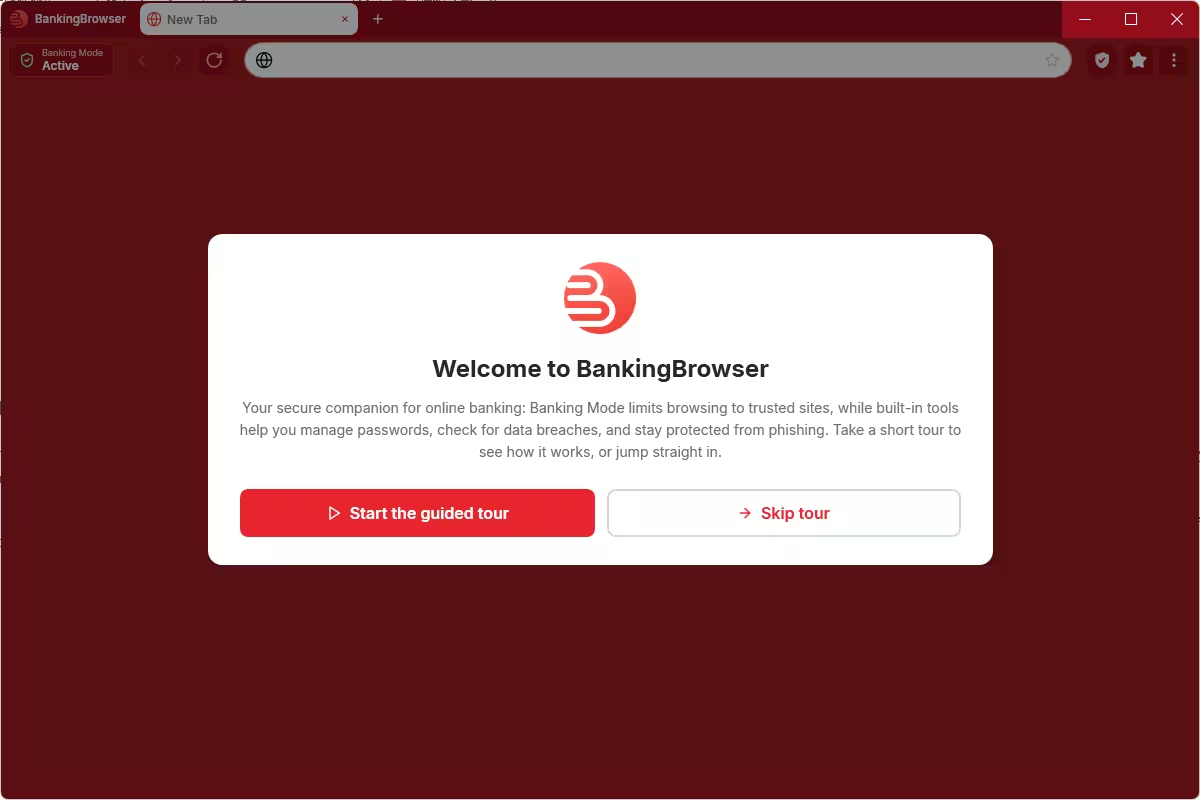
- On first launch, choose Start the guided tour for a quick walkthrough, or Skip tour to go straight to the start tab.
⚠️ Note for New Abelssoft Users
If you’ve installed other Abelssoft software on this PC before, the full version unlocks on its own. If not, you need to register a free email address once:
- After installation, enter your email address in the activation window when the program asks for it.
- Open the email from Abelssoft and click the confirmation link. Check your spam folder if it doesn’t arrive within a few minutes.
Once confirmed, the full version is unlocked. CHIP says registration lets you use the program without restrictions. It doesn’t say how long the giveaway licence lasts or whether it includes future major versions.
What’s New in the 2027 Version
When we covered the 2026 edition, BankingBrowser had a fairly plain interface with an address bar, navigation buttons and a switch for banking mode. The 2027 release keeps the same idea but changes nearly everything you see:
- Redesigned interface. A cleaner red-and-white layout with a Banking Mode Active badge always visible in the top-left corner.
- Everything on the start tab. Every new tab shows large buttons for Trusted Sites, Password Generator, Favorites, Browsing History and Downloads.
- Three-dot menu. The On-Screen Keyboard, history, downloads, password generator and Settings are now grouped in one menu at the top right.
- Guided tour. First-time users get an introductory walkthrough of every feature.
- Automatic updates. Turned on by default, with a manual Check for updates button in Settings.
- Faster browsing. According to CHIP, the technical overhaul also makes the browser more responsive.
Banking Mode and Trusted Sites
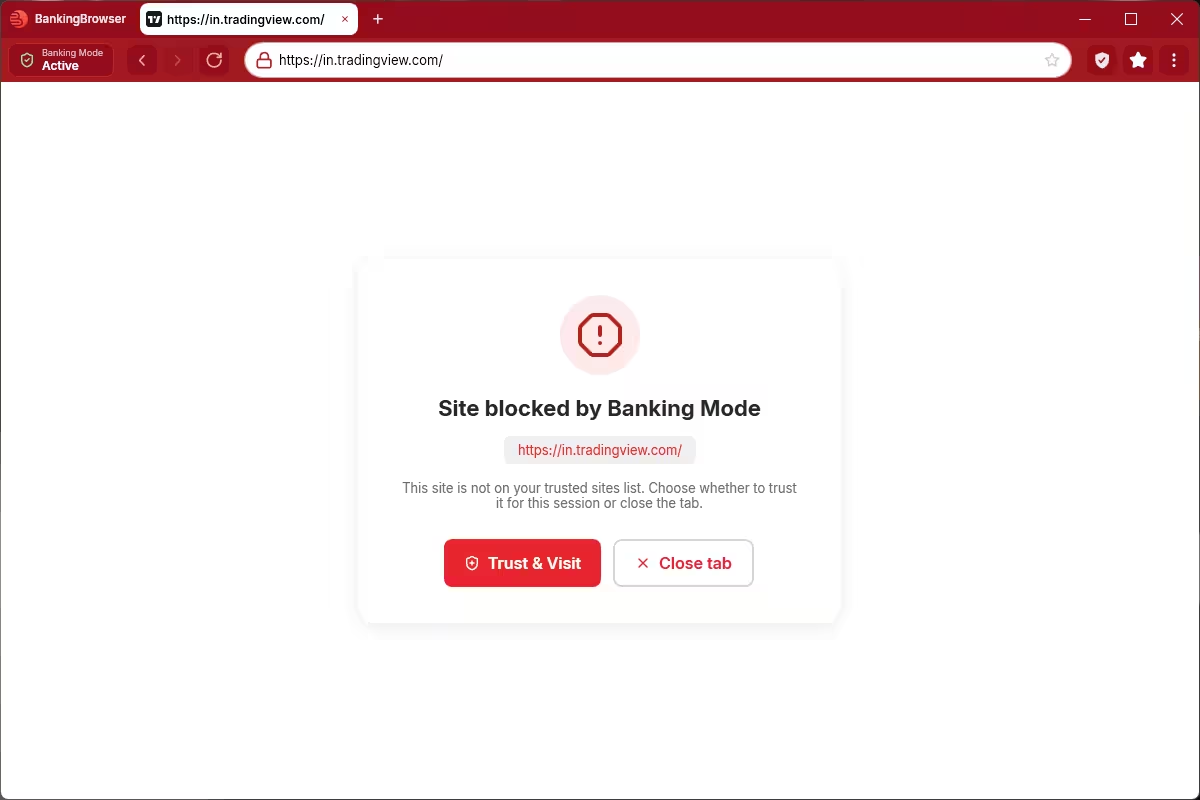
Banking Mode is the core of the program. It works as an allowlist: only sites on your trusted list load. Anything else, whether it’s a typo-squatted bank domain or a link from a suspicious message, opens to a Site blocked by Banking Mode page. From there you can click Trust & Visit to allow the site for the session or Close tab to back out. When we opened TradingView, which isn’t on the default list, it was blocked until we chose to trust it.
Keep in mind that Trust & Visit is a convenience button, not a safety check. It simply lets you override the block. Before approving any site, confirm the domain from an independent source, such as your bank’s official app or the address printed on your card or passbook. The allowlist also can’t tell you whether a trusted site is safe. It only stops sites that aren’t on the list, so your protection depends on keeping that list short and accurate.
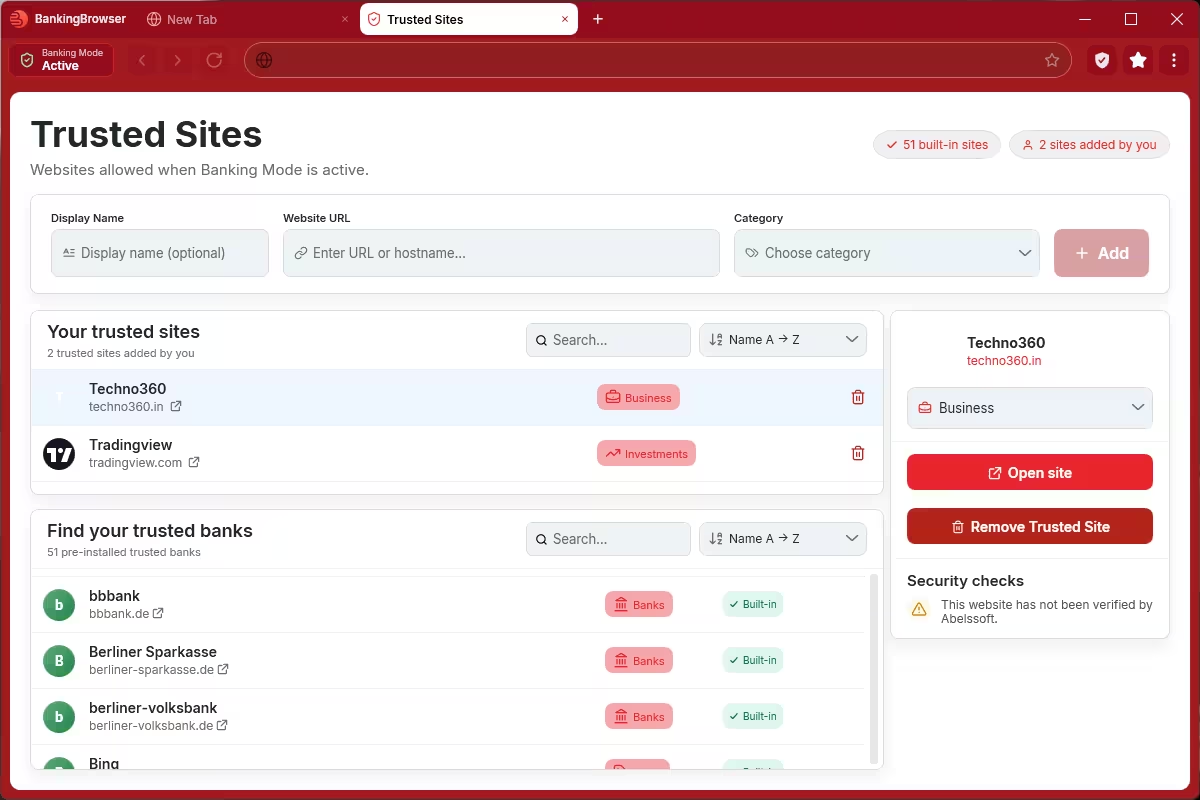
The Trusted Sites page lets you manage that list. You can add any site with an optional display name, its URL and a category such as Banks, Investments or Business. Sites you add appear under Your trusted sites, where you can open or remove them. Below that, Find your trusted banks lists the sites Abelssoft pre-installed (51 in our build), each marked Built-in. Sites you add yourself carry a small warning: This website has not been verified by Abelssoft. That’s a useful reminder to double-check the address before adding it.
⚠️ Using BankingBrowser in India? Add Your Bank First
The built-in list is made for German users. It’s mostly German banks such as Berliner Sparkasse and Berliner Volksbank, plus a few general sites. Indian banks aren’t on it, so your net banking page will be blocked the first time.
Before your first login, open Trusted Sites and add your bank’s official domain, for example onlinesbi.sbi for SBI, hdfcbank.com for HDFC Bank or icicibank.com for ICICI Bank. Copy the address from your bank’s passbook, card or official app rather than from an email or SMS link.
Built-in Security Tools
Apart from Banking Mode, BankingBrowser 2027 includes a few small tools aimed at keeping your login details safe. These are the ones we saw in our test:
- On-Screen Keyboard: lets you enter text using on-screen keys instead of your physical keyboard, which may reduce exposure to conventional keystroke logging. It’s not a guarantee against malware, screen capture or other kinds of input monitoring, so keep Windows and your security software up to date.
- Password Generator: create strong, random passwords for new banking or shopping accounts.
- Favorites, history and downloads: the usual browser basics, all reachable from the start tab.
Two more features come from CHIP’s and Abelssoft’s own descriptions, and we didn’t test them independently. CHIP says built-in anti-phishing protection warns you about suspicious activity, and the welcome screen says the tools help you check for data breaches.
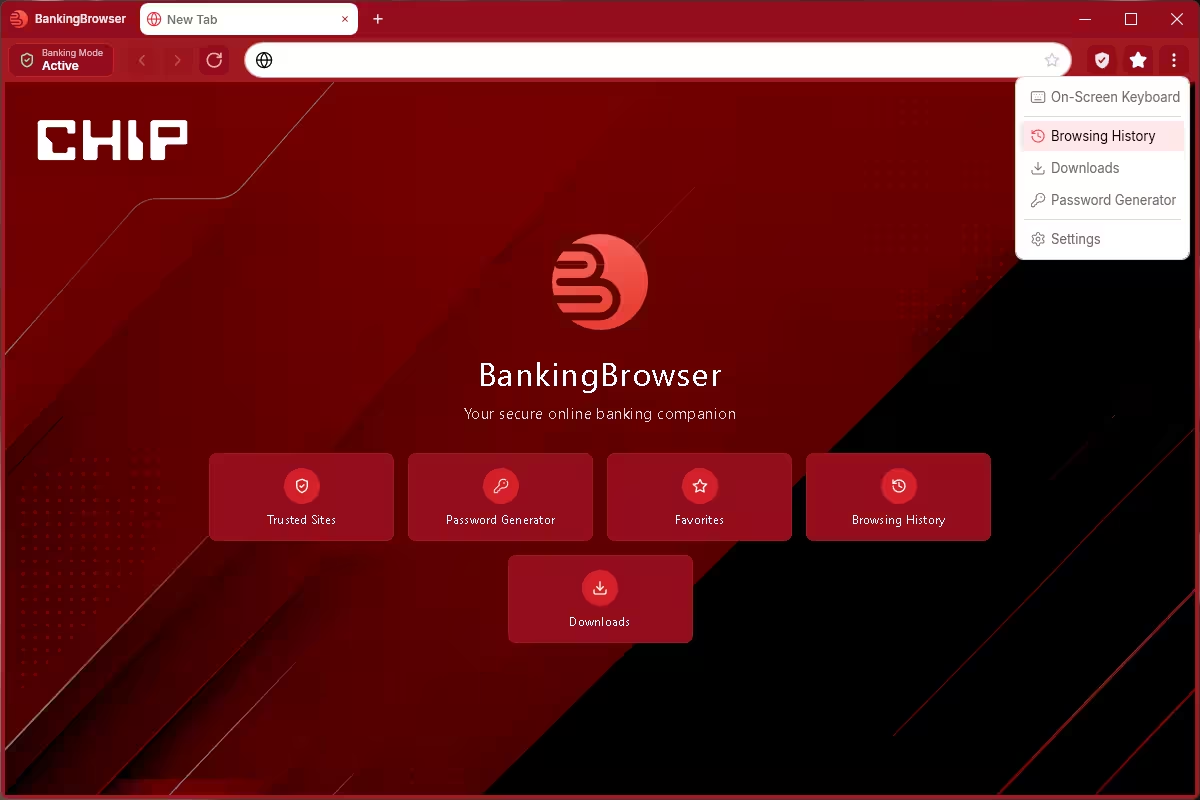
Older versions had a one-click calculator. We didn’t see it in the 2027 menus.
Settings and Updates
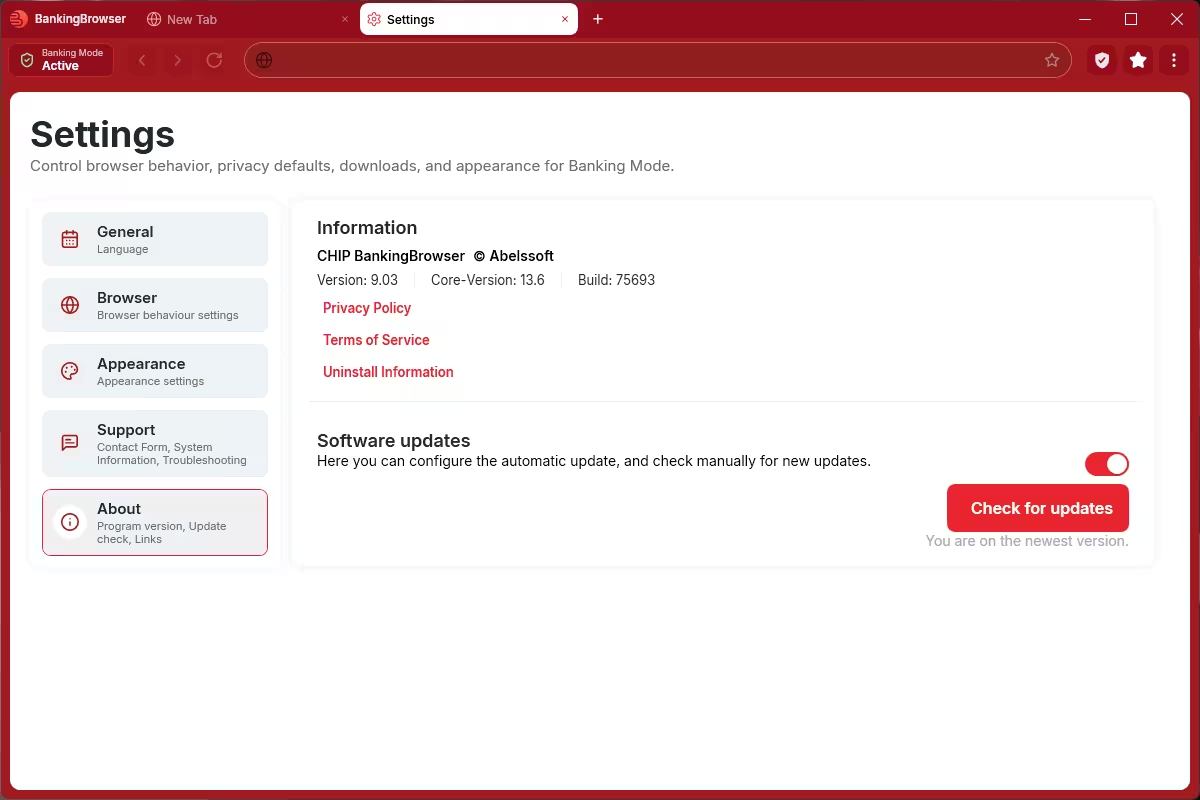
Settings opens in its own tab and is divided into five sections: General, Browser, Appearance, Support and About. The About page displays version 9.03, Core-Version 13.6 and Build 75693. Automatic updates were enabled in our Windows 11 installation. We also clicked Check for updates, and BankingBrowser displayed “You are on the newest version.” This confirms the update check’s result for our tested CHIP giveaway build.
Pros and Cons
| 👍 Pros | 👎 Cons |
|---|---|
| The strict allowlist blocks any site you haven’t trusted, including look-alike bank domains | The built-in list is aimed at German banks, so Indian users must add their bank manually |
| The clean new interface puts every tool on the start tab | New users must register an email address to unlock it |
| The on-screen keyboard protects against keyloggers | The CHIP branding may confuse people looking for “Abelssoft” |
| Automatic updates are on by default | Windows only (10 and 11) |
| The installer is small (8.3 MB) and setup is quick | It’s not a replacement for antivirus or your bank’s own OTP checks |
📊 Our Verdict
BankingBrowser 2027 does one job: it keeps your banking sessions inside a small set of sites you’ve approved. The 2027 redesign makes that much easier to manage. The start tab, Trusted Sites manager and block page are clear enough for less tech-savvy family members to use. It won’t replace antivirus software, and readers outside Germany have to add their own bank first. The protection is only as good as your trusted list: keep it limited to verified domains, and don’t approve sites just to get past the block screen. Used that way, it’s a simple, free extra layer of protection against phishing pages.
Frequently Asked Questions
Is BankingBrowser 2027 really free?
Yes. The giveaway installer gives you the full version. If no other Abelssoft software has been installed on your PC before, you just need to register a free email address once. The giveaway doesn’t state the licence duration or whether future major versions are included.
Is CHIP BankingBrowser the same as Abelssoft BankingBrowser?
Yes. CHIP BankingBrowser is the CHIP-branded edition of Abelssoft BankingBrowser 2027. The About page credits Abelssoft, and the installer is signed by Ascora GmbH, the company behind Abelssoft.
Does BankingBrowser work with Indian banks?
Yes, but you have to add them yourself. The pre-installed list covers German banks, so open Trusted Sites and add your bank’s official domain (for example onlinesbi.sbi, hdfcbank.com or icicibank.com) before logging in.
What happens when I open a site that isn’t trusted?
With Banking Mode active, BankingBrowser shows a “Site blocked by Banking Mode” page. You can click Trust & Visit to allow it for the session or Close tab to leave. Only approve a site after you’ve confirmed its domain from an independent source.
Can BankingBrowser replace my antivirus?
No. It protects your banking sessions by blocking untrusted sites and offering an on-screen keyboard, but it doesn’t scan your PC for malware. Keep your antivirus running alongside it.
Which Windows versions are supported?
Windows 10 and Windows 11, according to CHIP. Note that standard Windows 10 support ended on 14 October 2025. If you still bank on a Windows 10 PC, make sure it gets security updates, for example through Microsoft’s Extended Security Updates programme.
Looking for more free security software? Browse our latest freebies and more Abelssoft giveaways such as KeyDepot and AntiBrowserSpy. You can also read our guide to passkeys and passwordless login.