
🎁 Reader Giveaway · Updated 18 October 2026
Version 20 is out, and this key switched my PC to Pro on the first try
I installed Advanced SystemCare 20 on my own Windows machine, pasted the code below, and License Manager changed to Activated. Pro runs until 14 January 2027. The end date stays the same whenever you activate, so every day you wait is a day of Pro you lose.
⚠️ This code reached its end date on 14 January 2027 and no longer gives Pro access. The review below is still accurate for version 20. Check our latest giveaways for a current offer.
Your giveaway license code
D809E-5BEBC-D3294-42FI4
⚡ Quick Read
- The deal: a free Advanced SystemCare 20 Pro subscription that ends on 14 January 2027, no matter which day you activate it.
- What’s new in 20: Custom Clean for junk, duplicate and large files, a scan engine that checks several modules at once, plus network-speed and disk-temperature monitoring.
- What I found: 5 outdated apps (Firefox, Windows Terminal, Notepad and two more) and 11 startup items worth trimming.
- Watch out for: an iTop VPN pitch in the Protect tab, and a setting that skips Windows’ UAC prompt, which I’d switch off.
- No antivirus inside. Keep Microsoft Defender or your current security suite running alongside it.
I’ve been writing about Advanced SystemCare on Techno360 for years, and every autumn or so IObit bumps the version number. Most years the change is a fresh coat of paint. Version 20 is a bit different: the headline feature is a proper disk-space cleaner, which is what most people want from a tool like this when their C drive turns red.
This page used to cover version 19. Rather than leave you with an old build and old codes, I’ve rewritten it around version 20: new screenshots from my own PC, a fresh Pro key that I activated before publishing, and honest notes on which parts are worth your time.
🔄 What changed on this page (18 Oct 2026): rewritten for Advanced SystemCare 20, a new Pro code valid until 14 January 2027, all-new screenshots, and the version 19 keys removed. I haven’t tested those older keys on version 20, so I’d rather not send you chasing them.
What’s new in Advanced SystemCare 20
IObit announced version 20 on 9 September 2026. Strip away the press-release language and there are three real changes.
1. Custom Clean: finally, a space finder built in
There’s a new Custom Clean tab in the sidebar with three ticks: Junk Files, Duplicate Files and Large Files. You pick a drive from the dropdown and hit Scan. According to IObit, the large-file pass hunts for bulky videos, disk images, ISO files and forgotten installers in places like Downloads and Documents, and you can preview them before anything is deleted. The duplicate finder keeps one copy of each identical photo, video, document or song.
In older versions, Large File Finder and Duplicate File Finder were buried in the toolbox. Putting them on the main sidebar is a small change that makes a big difference, because now people will actually use them.
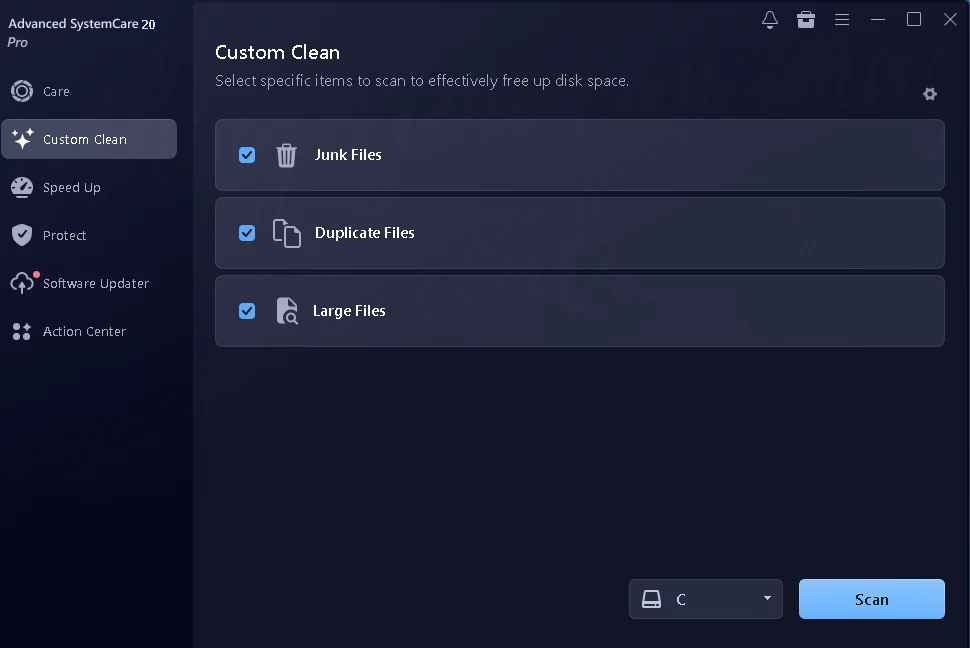
My advice: treat the large-file results as a shopping list, not a delete button. An ISO you downloaded last year is probably safe to bin. A large video in Documents might be the only copy of your kid’s school function. Read the list before you clear it.
2. A rebuilt scan engine
IObit calls it Smart Scan. Instead of checking one module after another, it runs several at the same time, and IObit says it flags fewer false positives. The big SCAN button on the Care tab still gives you AI Mode (it decides what to check) or Manual Mode (you tick the boxes). On my PC the scan felt quicker than version 19, but I didn’t time either run, so I won’t quote you a number. How long it takes depends heavily on how cluttered your drive is.
3. Network speed and disk temperature monitoring
IObit says version 20 adds a live upload/download readout, handy for catching a background app quietly eating your bandwidth, and a disk-temperature monitor that warns you before a drive runs hot. The Performance Monitor was set to load at Windows startup on my install. If you’d rather keep your system tray tidy, you can turn it off under Settings → General Settings.
My hands-on test with the Pro key
I tested on my everyday Windows PC, not a fresh virtual machine. That matters, because a clean test install always looks great. A machine that’s been in daily use for months is where you see whether a cleaner earns its place.
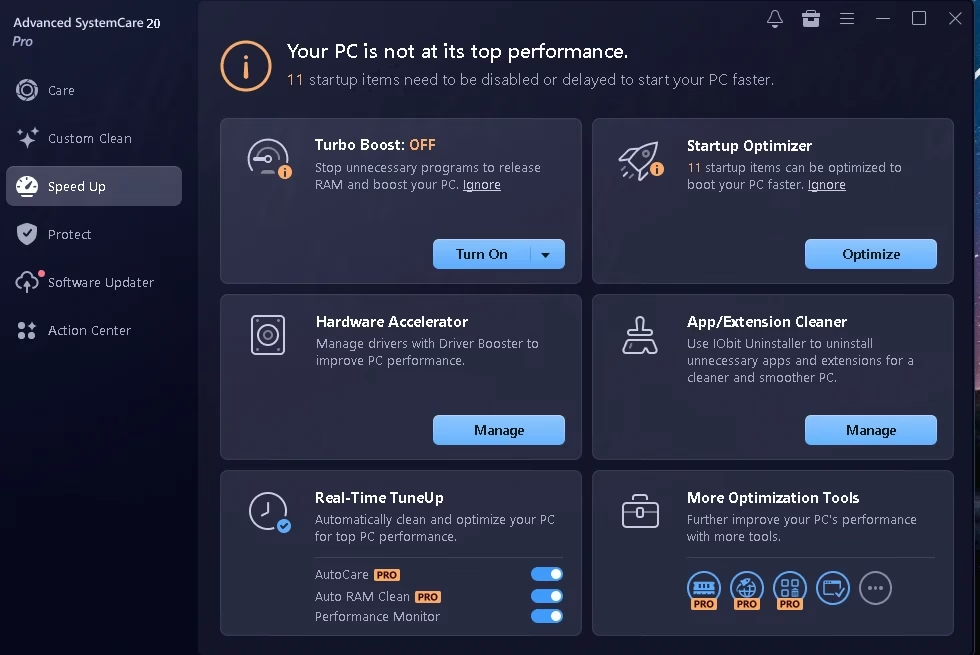
Speed Up: 11 startup items flagged
The Speed Up tab told me 11 startup items could be disabled or delayed. Startup Optimizer is the tile I’d open first, because trimming startup apps is the change most likely to shorten boot time. Turbo Boost was off out of the box. It pauses background programs to free up RAM, which helps during a game or a heavy export, but you don’t need it running all day.
Two tiles are really shortcuts to other products. Hardware Accelerator opens Driver Booster, and App/Extension Cleaner opens IObit Uninstaller. If you want the full Driver Booster experience, we have a Driver Booster 14 Pro giveaway with a key that runs until 29 March 2027.
Software Updater: the part I’d pay for
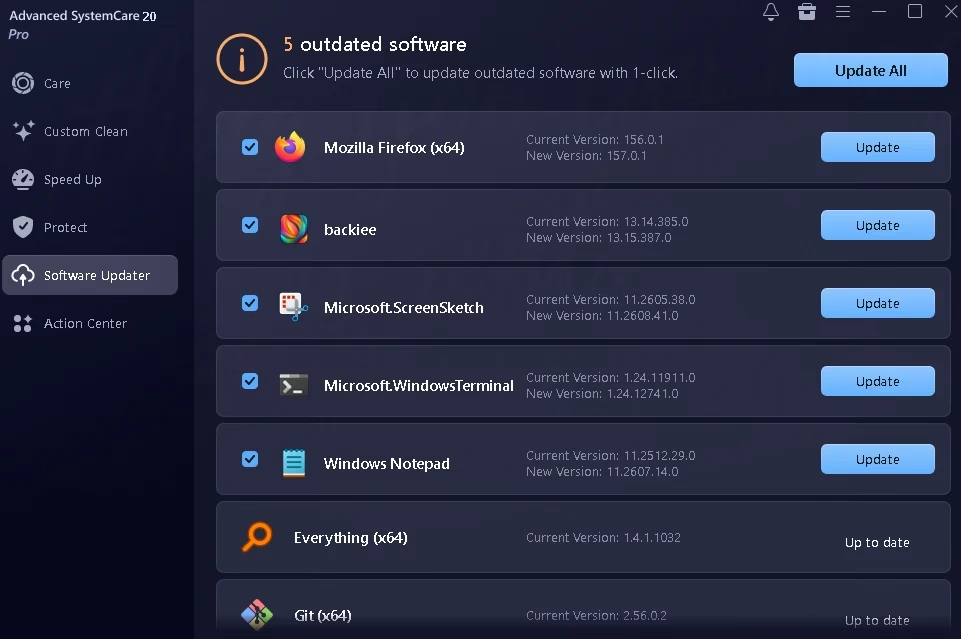
This is still the most useful thing in the suite. It found five outdated programs: Mozilla Firefox, the backiee wallpaper app, Windows Terminal, Windows Notepad and Microsoft’s ScreenSketch package (that’s the Snipping Tool). It also marked Everything and Git as up to date, which they were, so no false alarms.
Notice that three of those five are Microsoft Store apps. Plenty of updaters ignore Store apps entirely, so this is a real plus. Out-of-date software is a common way in for malware, and this catches it without you opening each app’s About box. I’d still glance down the list before clicking Update All, just to make sure nothing you deliberately kept on an older version gets bumped.
Protect: useful toggles, plus a VPN pitch
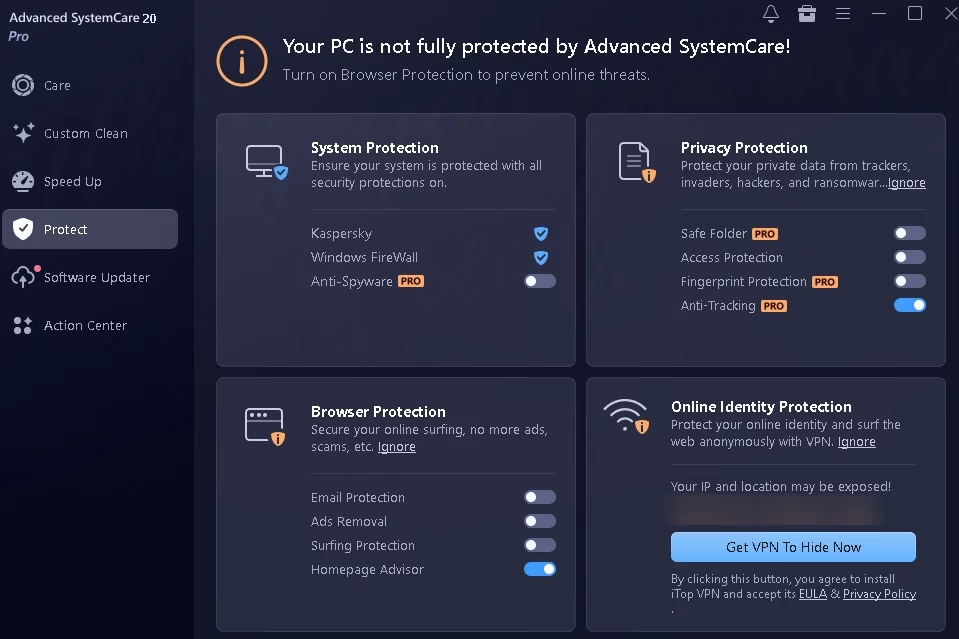
The Protect tab picked up my existing Kaspersky install and Windows Firewall straight away, which is reassuring: it isn’t trying to replace your antivirus. Under Privacy Protection you’ll find Safe Folder (a locked folder for sensitive files), Fingerprint Protection, Access Protection and Anti-Tracking. Only Anti-Tracking was on after activation. If you keep scanned ID cards or tax papers on your PC, Safe Folder is worth a few minutes to set up. Just remember it’s a Pro feature and this key has an end date (more on that in the FAQ).
The bottom-right card is an ad. It shows your public IP address and town, then offers a Get VPN To Hide Now button that installs iTop VPN. Skip it unless you actually want that VPN. If you ever share a screenshot of this tab, blur that line first, as I have below.
One setting I’d change right away
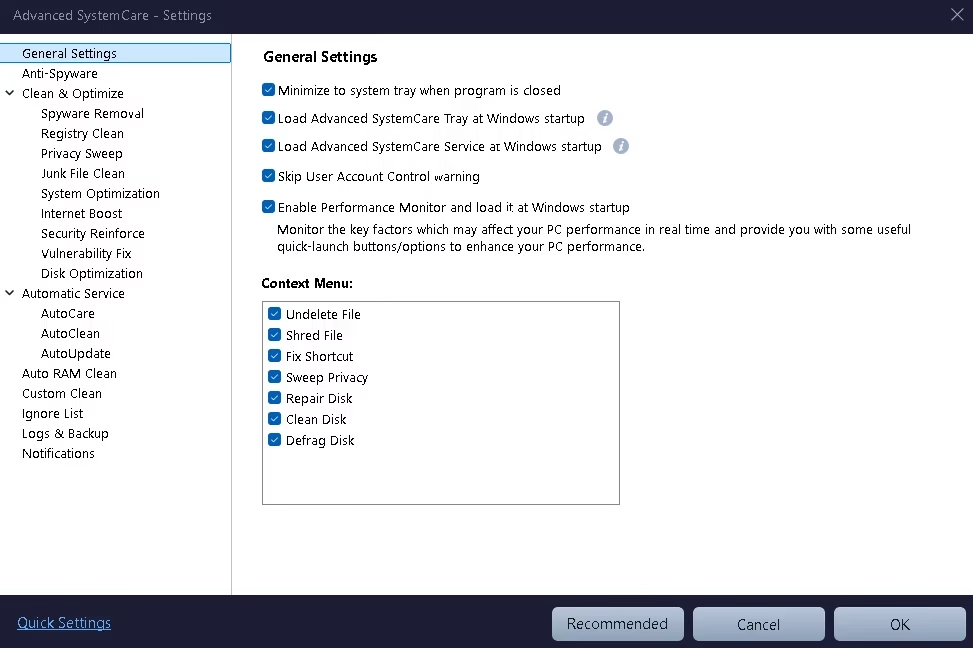
Open ☰ menu → Settings → General Settings. Most of the boxes there are harmless: minimise to tray, load at startup, run the Performance Monitor. But “Skip User Account Control warning” was ticked on my install. UAC is the Windows prompt that asks before a program makes system-level changes. I’d rather see that prompt, so I unticked it. It costs you one extra click now and then, and it’s one less shortcut around a Windows safety check.
The same page lets you trim the right-click menu. Advanced SystemCare adds seven entries (Undelete File, Shred File, Fix Shortcut, Sweep Privacy, Repair Disk, Clean Disk and Defrag Disk). If your context menu already feels crowded, untick the ones you’ll never use.
Right after you activate Pro, a pop-up offers an Enable all features button. Most of what it turns on is fine, but notice that Registry Deep Clean and Secure File Deletion stay off. That’s the right call. Registry cleaning brings little benefit on modern Windows, and secure deletion (DoD 5220.22-M overwriting) is slow and only needed when you’re getting rid of truly sensitive files.
Giveaway details at a glance
| Product | Advanced SystemCare 20 Pro by IObit |
| License code | D809E-5BEBC-D3294-42FI4 |
| Pro until | 14 January 2027, a fixed end date |
| Activation limit | Not disclosed; treat it as first come, first served |
| Works on | Windows 11, 10, 8/8.1, 7, Vista and XP |
| Normal price | $29.99/year for 1 PC on IObit’s US store, often discounted (checked 18 Oct 2026; prices vary by region). 60-day money-back guarantee. |
| Antivirus included? | No. That’s Advanced SystemCare Ultimate. |
Free vs Pro: what the key actually gets you
The free edition handles the basics: startup cleanup, junk removal and one-click RAM release. Here’s what switches on once the giveaway key is in, based on IObit’s own comparison and what I saw in the app:
| Feature | Free | Pro (this key) |
|---|---|---|
| Junk cleaning and startup optimisation | ✔ | ✔ |
| RAM release | Manual | Automatic |
| One-click update of outdated software | — | ✔ |
| Safe Folder for sensitive files | — | ✔ |
| Anti-Tracking and Fingerprint Protection | — | ✔ |
| AutoCare, AutoUpdate and deeper cleaning | — | ✔ |
| Premium technical support | — | ✔ |
Want antivirus in the same window? Advanced SystemCare Ultimate bundles these tools with a Bitdefender-based scanner, and our Advanced SystemCare Ultimate 18 giveaway has a 6-month key for the first 200 PCs, valid until 2 November 2026.
How to activate the free Advanced SystemCare 20 Pro license
- Download the free edition from IObit’s official Advanced SystemCare page. Avoid mirror sites.
- Run the installer and choose Custom install. Untick any extra IObit apps you don’t want.
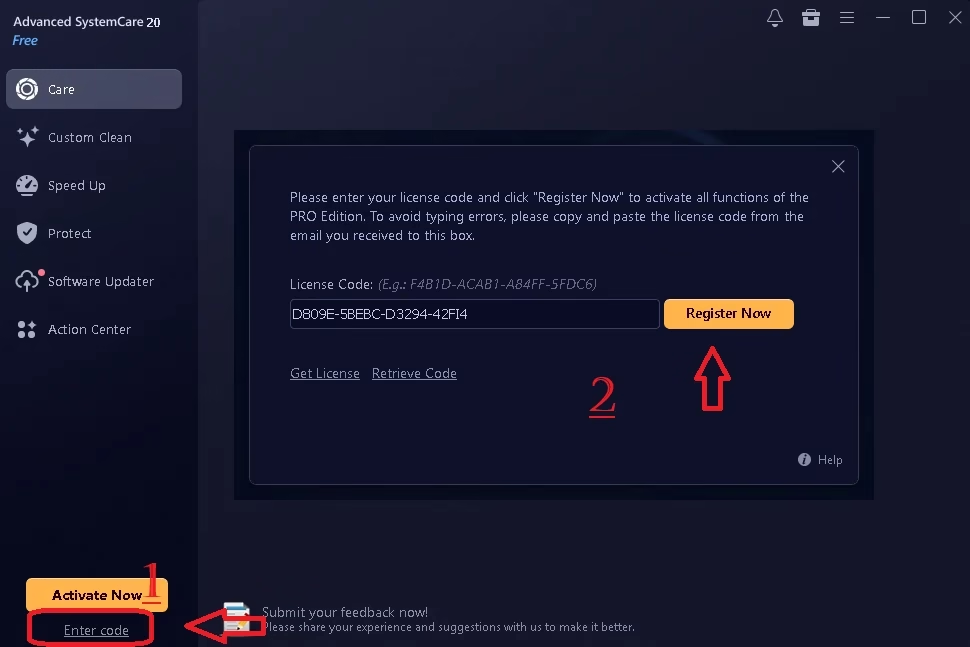
- Open the program. Below the orange Activate Now button at the bottom left, click Enter code.
- Paste
D809E-5BEBC-D3294-42FI4into the box. Copy and paste it rather than typing. - Click Register Now. The label under the program name switches from “Free” to “Pro”.
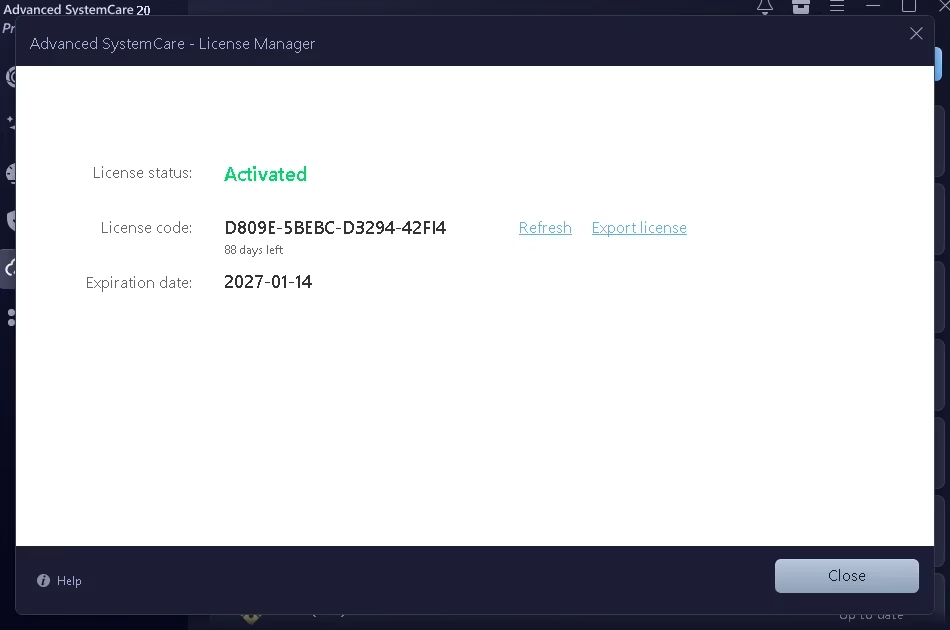
- To double-check, open ☰ menu → My Subscription. You should see License status: Activated and an expiration date of 2027-01-14.
⚠️ Code rejected? First, check you copied all 23 characters, including the three hyphens, with no space at either end. If it’s still refused, the code has probably hit its activation limit or passed its end date. Leave a comment below and I’ll update this page if a new code becomes available.
Pros and cons
| 👍 What I liked | 👎 What could be better |
|---|---|
| Custom Clean puts large and duplicate file hunting front and centre | “Skip UAC warning” was ticked on my install |
| Software Updater covers Microsoft Store apps, with no false alarms in my test | iTop VPN upsell in the Protect tab |
| Works alongside your existing antivirus and detected it correctly | Two Speed Up tiles just open other IObit apps |
| Riskier options (registry deep clean, secure delete) stay off until you choose them | Giveaway runs to a fixed date, so late activations get fewer days |
| Still supports Windows 7, Vista and even XP | No built-in antivirus; you need Ultimate for that |
If you decide to remove it later, Windows’ own uninstaller leaves bits behind. Our guide on how to completely uninstall programs on Windows 11 shows how to clear the leftovers.
📊 Our Take
Is Advanced SystemCare 20 Pro worth installing?
For free, yes, and version 20 gives you more reason to than 19 did. Custom Clean tackles a problem most people actually have (a full C drive), and the Software Updater keeps doing its quiet, useful job. Spend two minutes on setup: untick the UAC skip, ignore the VPN card, and leave registry deep clean off.
Get it if your drive is filling up or you never remember to update your apps. Skip it if you already tidy your PC by hand and keep Windows lean. You won’t miss much.
Frequently asked questions
Is this Advanced SystemCare 20 Pro key safe to use?
Yes. You download the software from IObit’s official website and enter the code in the program’s own License Manager. Nothing is cracked, patched or downloaded from a third-party site.
How long does the free license last?
Pro runs until 14 January 2027. The end date stays the same whenever you activate, so activating today gets you more Pro days than activating next month.
What happens when the Pro subscription expires?
The Pro features stop and the program asks you to renew. If you’ve put anything in Safe Folder, move it back to a normal folder before 14 January 2027 so you don’t have to deal with a locked Pro feature after the license ends.
Does Advanced SystemCare 20 include antivirus?
No. It has anti-spyware and privacy tools, but not a full real-time antivirus. Keep Microsoft Defender or your existing security suite running. In my test it detected Kaspersky and Windows Firewall and worked alongside them without trouble.
Does it work on Windows 11?
Yes. IObit lists support for Windows 11, 10, 8/8.1, 7, Vista and XP.
I already have Advanced SystemCare 19. Should I upgrade?
If you want Custom Clean and the new monitoring tools, yes. Download version 20 from IObit’s official site, install it, then enter the code under Enter code.
✍️ Tested and written by Ramakanth
I run Techno360 from Chennai and have been testing Windows utilities and software giveaways here since 2008, after several years in IT support. The key on this page was activated on my own PC before publishing, and every screenshot comes from that test. Feature claims I couldn’t check myself, such as the new scan engine’s accuracy, are credited to IObit. Hit a problem? Leave a comment and I’ll look into it. More giveaways like this live in our free software giveaways section. About Techno360.

![Wise Registry Cleaner Pro v11 Free for 1 Year [Worth $29.95] | Free Download](https://freedownload.co.in/wp-content/uploads/2024/06/Wise-Registry-Cleaner-Pro-Box.png?v=1719554291)