🎁 UNHACKME FREE LICENSE · UPDATED NOVEMBER 17, 2026 · NEW KEY
Find the rootkits and hidden malware your antivirus walks past — free
The latest UnHackMe free license giveaway is live through SharewareOnSale, this time for version 18.90. Download the giveaway installer, paste one licence key and you have a registered copy of this second-opinion malware and rootkit scanner for Windows — no sign-up, no email, no card.
Price today: $0 $24.95 Windows 11/10/8.1/8/7 Version 18.90 ⏳ Ends around Nov 18
⚡ Quick Read
- What: UnHackMe 18.90 by Greatis Software — an on-demand rootkit, Trojan, adware and PUP scanner that runs alongside your antivirus.
- Giveaway: SharewareOnSale Edition, version 18.90.2026.1110, with a shared licence key. SharewareOnSale lists it as a 1-computer lifetime licence for non-commercial use.
- How: download the giveaway ZIP, install, open the Register tab and paste the key. No account needed.
- Catch: no free updates and no technical support. Updating the program may remove the registration, so stay on this build.
- Deadline: SharewareOnSale’s countdown pointed to about November 18, 2026 when we checked on November 17 — activate today. Jump to the licence key ↓
What is UnHackMe?
UnHackMe is a Windows security tool from Greatis Software that has been around since 2005. It began as an anti-rootkit utility and now also goes after Trojans, adware, browser hijackers, search redirects and potentially unwanted programs (PUPs).
It is not an antivirus, and Greatis says so itself. An antivirus sits in the background and blocks bad files as they arrive. UnHackMe works the other way round: it lists what is already loading on your PC — startup entries, services, drivers, browser add-ons, shortcuts, hosts file and DNS settings — and lets you inspect and remove anything that should not be there. These inspection tools can also help you investigate certain “fileless” threats that work through registry entries, scheduled tasks, scripts or browser settings rather than a conventional infected file.
So keep Microsoft Defender or whichever antivirus you use switched on, and treat UnHackMe as the second opinion you call in when the PC still misbehaves — pop-up ads, search redirects, a browser homepage that keeps changing, or unexplained CPU load.
UnHackMe 18.90 key features
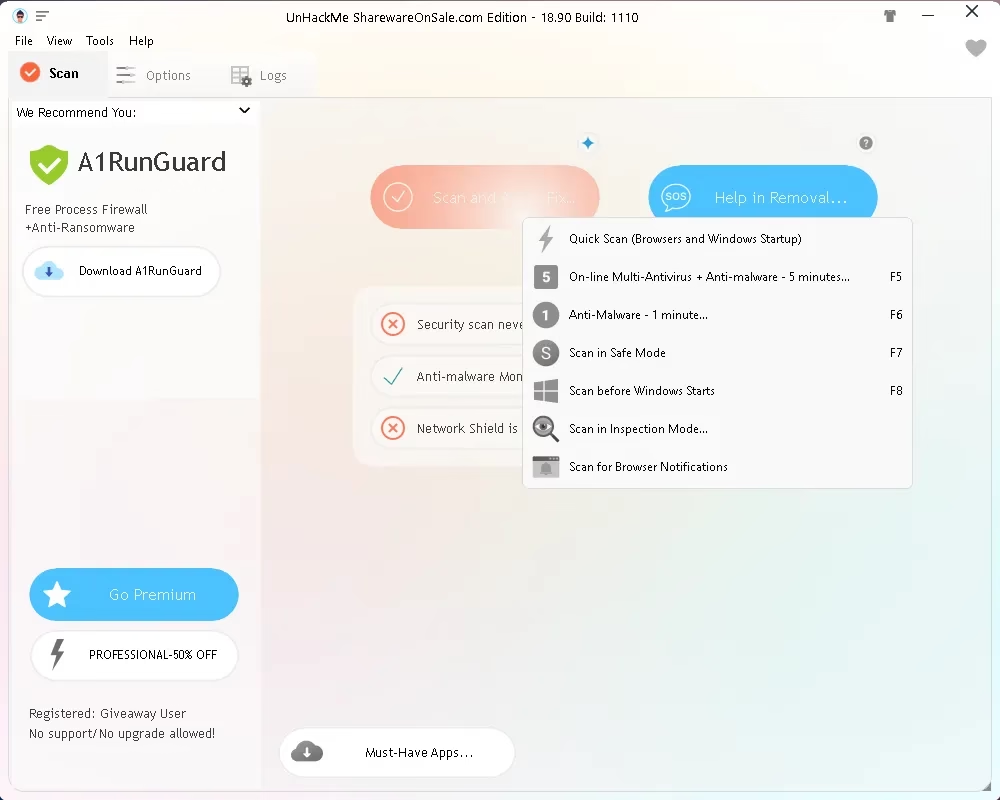
The Scan button in the giveaway build opens seven scan types:
- Quick Scan: checks browsers and Windows startup only.
- On-line Multi-Antivirus + Anti-malware: the fullest check, labelled as about 5 minutes (F5).
- Anti-Malware: a faster pass labelled as about 1 minute (F6).
- Scan in Safe Mode: restarts into Safe Mode to scan with less running (F7).
- Scan before Windows Starts: a boot-time scan for threats that hide once Windows is up (F8).
- Scan in Inspection Mode: a manual review of everything that loads.
- Scan for Browser Notifications: finds sites that push spam notifications.
More UnHackMe 18.90 features
Beyond the scan types, this is what you get:
- Eight-stage scan wizard: results are grouped into stages — processes, PUPs, startup programs, search settings, browser add-ons, services and more — and you approve each one before moving on.
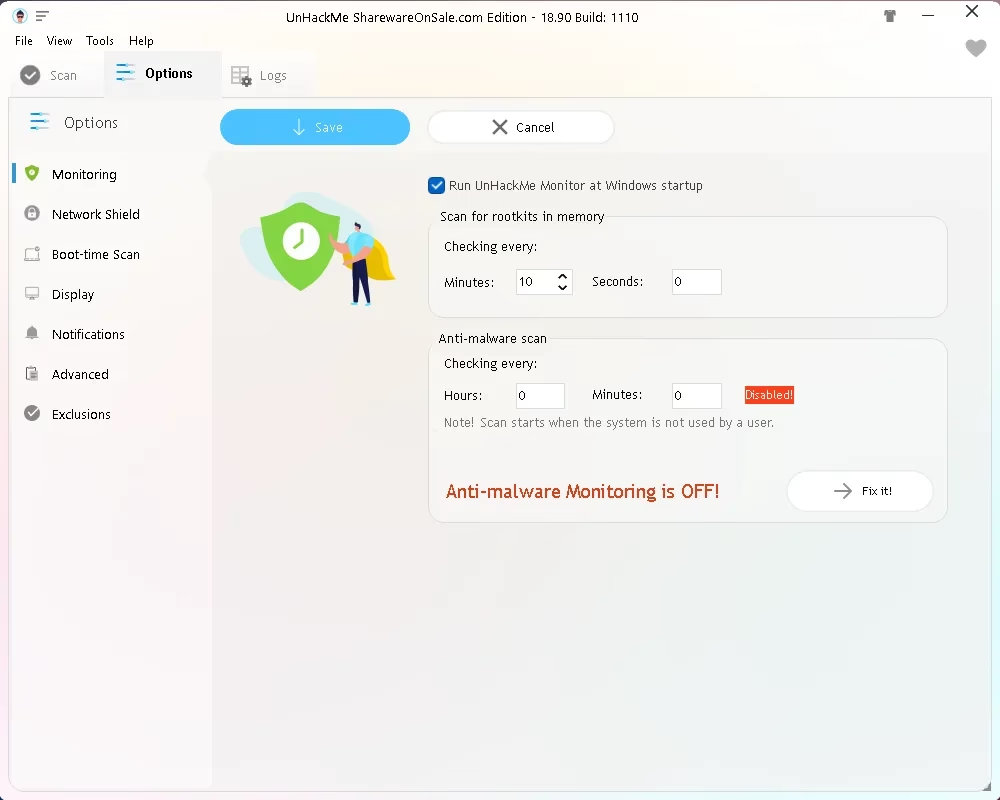
- Rootkit check in memory: UnHackMe Monitor is set to start with Windows and checks memory for rootkits on a timer — every 10 minutes by default in our install. This is a separate setting from the anti-malware scan below.
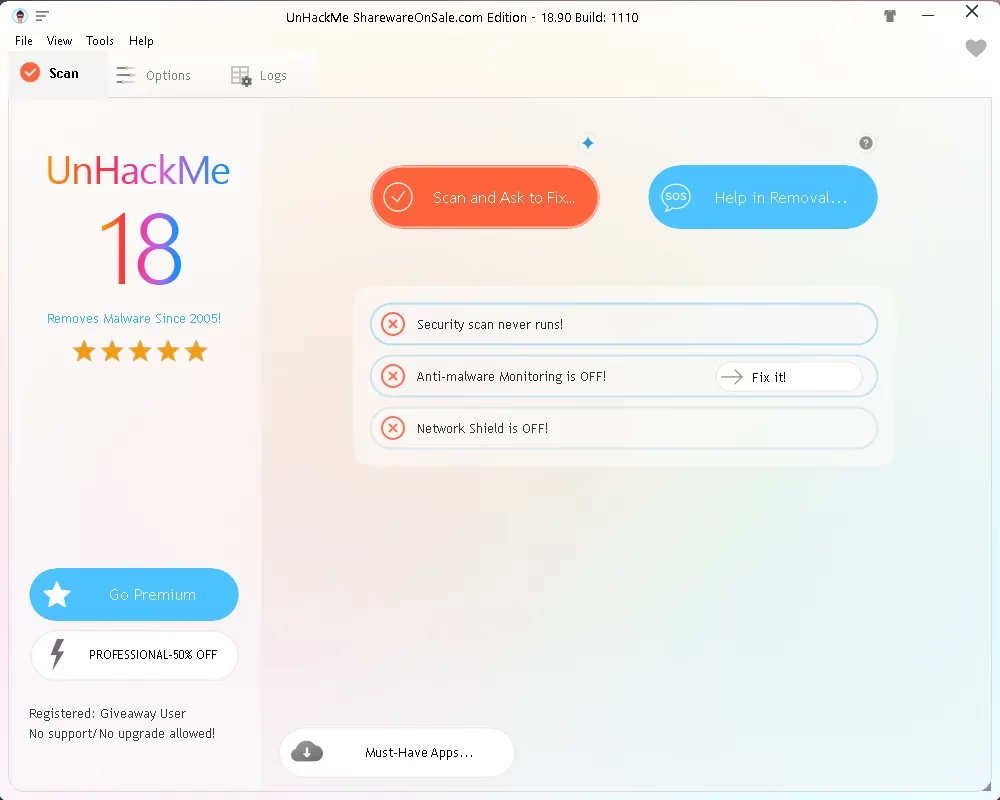
- Scheduled anti-malware scan: disabled by default, which is why the main window says “Anti-malware Monitoring is OFF!”. One click on “Fix it!” turns it on, and it only runs when the PC is idle.
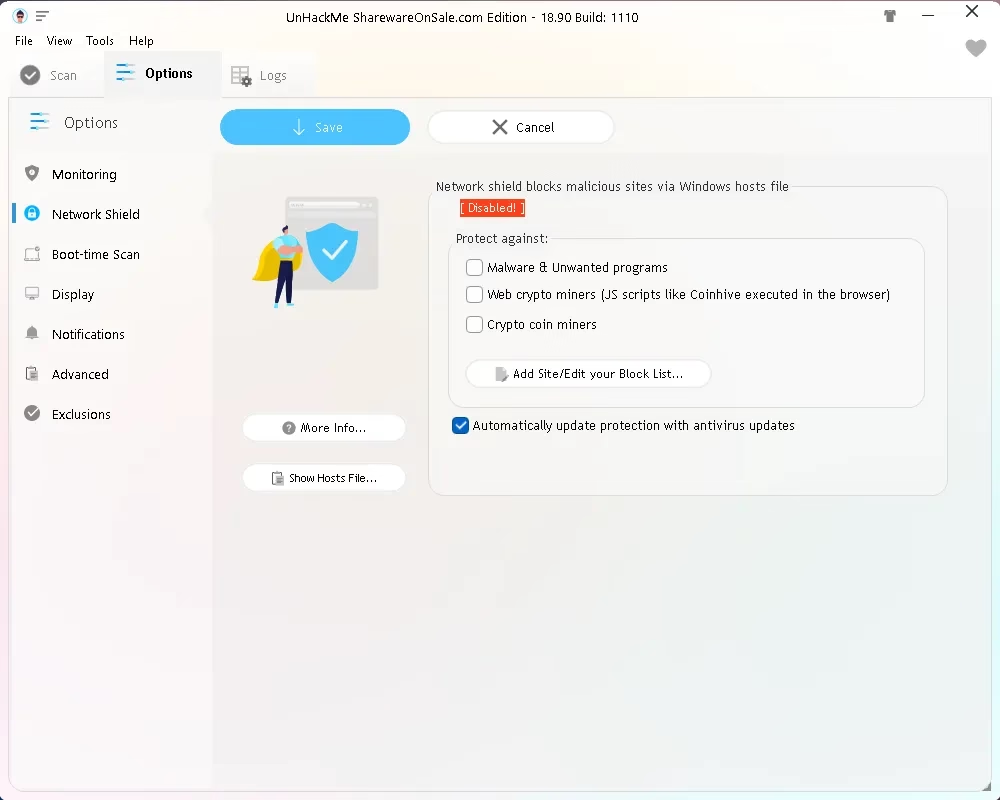
- Network Shield: blocks malicious sites, web crypto miners and coin miners through the Windows hosts file. It is also off by default.
- VirusTotal check: Greatis says startup files can be tested against several antivirus engines on VirusTotal. Keep in mind that anything uploaded to VirusTotal is shared with its security partners, so use it for program files, not personal documents.
- False-positive control: every result can be marked “False Positive” instead of removed, so you stay in charge.
- Small footprint: the giveaway installer is 45.7 MB, and the program does no real-time file scanning.
What is new in UnHackMe 18.90
Greatis released version 18.90.2026.1110 on November 10, 2026 with an improved malware scanning engine, updated antivirus databases and removal rules for a fresh batch of adware and hijacker domains. The previous build, 18.85, updated compatibility with the latest Windows feature update.
Giveaway terms at a glance
| Software | UnHackMe 18.90 — SharewareOnSale Edition (Windows) |
| Version | 18.90.2026.1110 (build 1110) |
| Normal price | $24.95 on SharewareOnSale, the same as the “UnHackMe Single (no Warrior)” lifetime licence on Greatis’ store, November 2026 |
| Giveaway licence | 1 computer, lifetime, non-commercial use (as listed by SharewareOnSale) |
| Updates | Not included — updating the giveaway build may make it unregistered |
| Support | No free technical support |
| System | Windows 11, 10, 8.1, 8 and 7 (32-bit and 64-bit) |
| Download size | 45 MB ZIP containing unhackme-giveaway.exe |
| Deadline | Key must be redeemed before the offer ends — around November 18, 2026 by SharewareOnSale’s countdown |
⚠️ “Lifetime” has a limit here. The licence does not expire, but it covers this build only. After activation the program itself shows “No support/No upgrade allowed!”. The $24.95 value also matches Greatis’ edition without Warrior, the offline boot-disc scanner, so do not count on that tool being part of this giveaway.
How to get your UnHackMe 18.90 free license key
It takes about three minutes. Tip: copy and paste the licence key rather than typing it — one wrong character and registration fails.
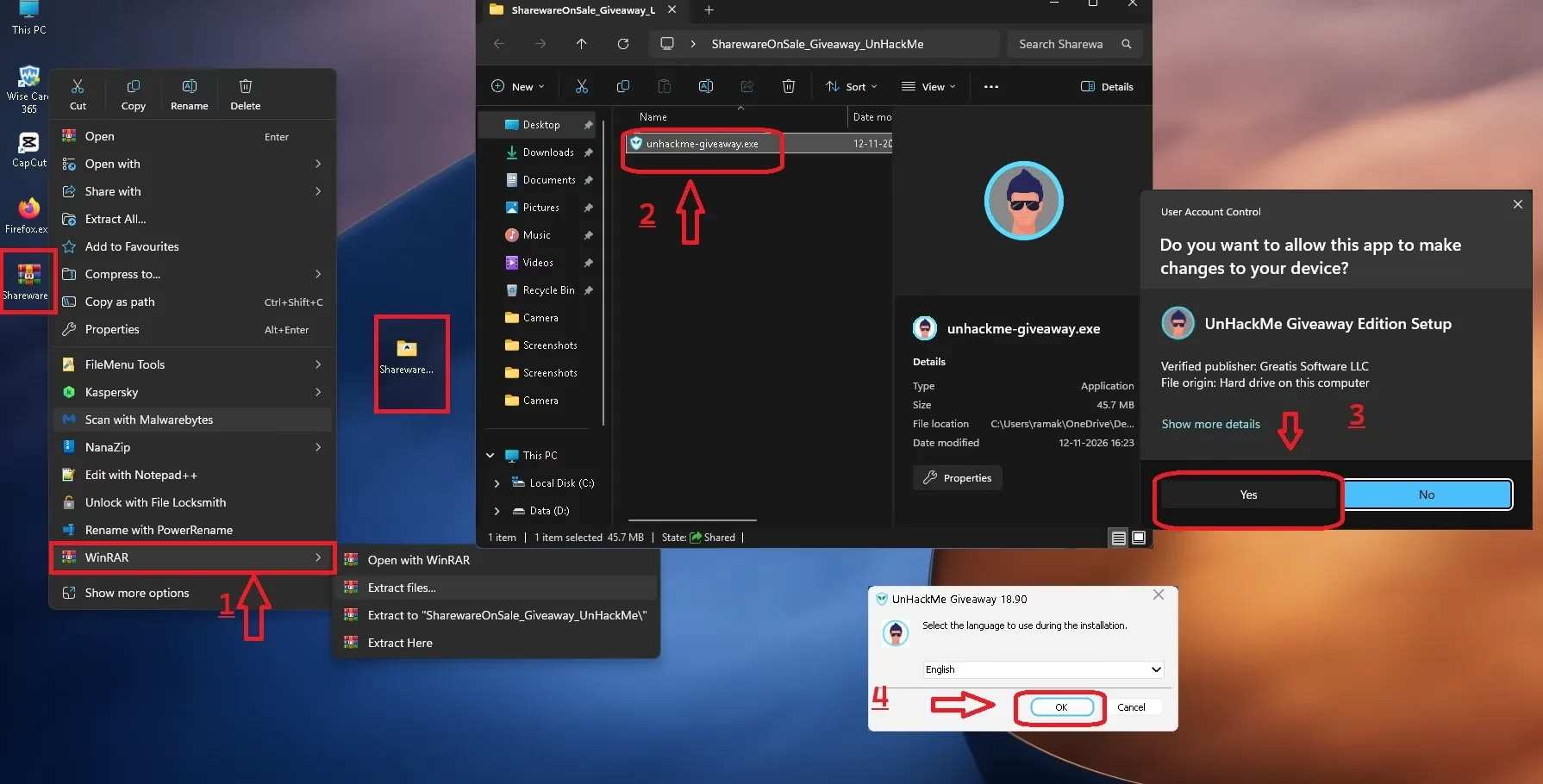
- Download the giveaway ZIP with the button below. It is served from SharewareOnSale’s download server.
- Extract the ZIP: right-click it and choose “Extract All…”, or use WinRAR, 7-Zip or NanaZip.
- Open the extracted folder and run unhackme-giveaway.exe. Click “Yes” on the Windows prompt, which should name Greatis Software LLC as the verified publisher.
- Pick your language, click “OK” and finish the setup.
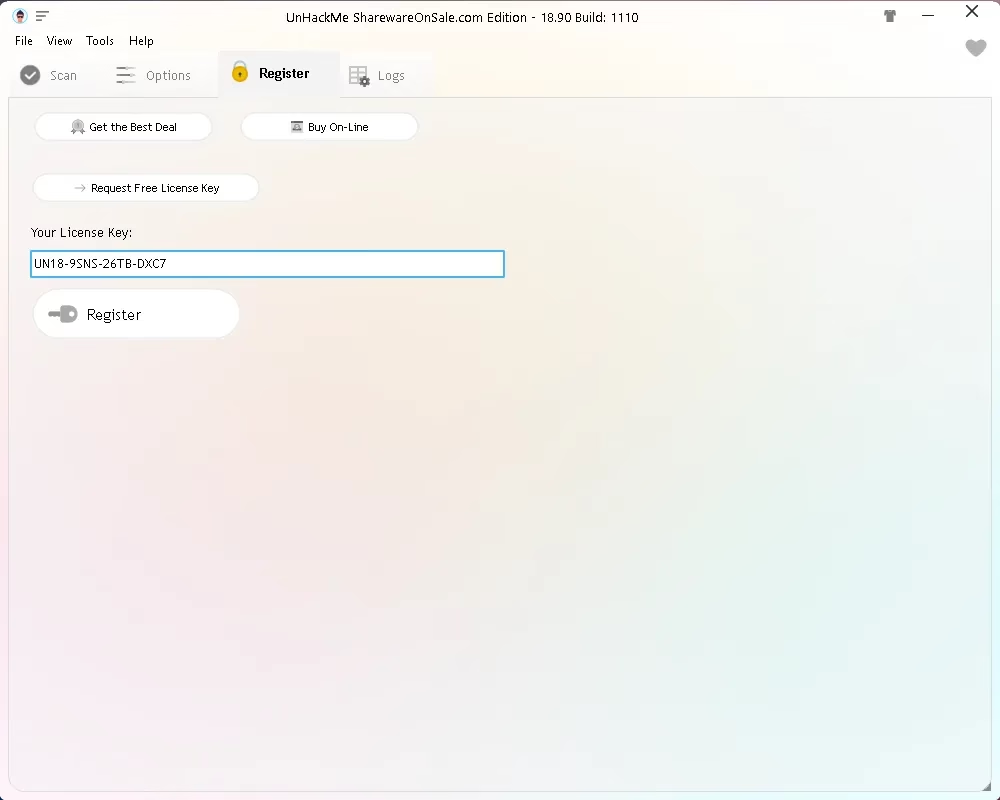
- UnHackMe opens showing “Not Registered Yet”. Click the Register tab at the top.
- Paste the key below into the “Your License Key” box and click Register.
- The Register tab disappears and the bottom-left corner now reads “Registered: Giveaway User”. Done.
⬇ Download UnHackMe 18.90 giveaway installer (ZIP, 45 MB)
🔑 FREE UNHACKME 18.90 LICENSE KEY (NOVEMBER 2026)
UN18-9SNS-26TB-DXC7
Paste it into the Register tab and click “Register”. It works with the giveaway installer above.
⚠️ Key not working? Use the giveaway installer from the button above — this key is meant for the SharewareOnSale Edition, not the trial from Greatis’ own site. Check for stray spaces before and after the key. And once it is registered, do not update the program: SharewareOnSale warns that an update may un-register it. If the key has stopped working altogether, the offer has probably ended — leave a comment and we will look for a new one.
Want to verify the download? The ZIP we downloaded on November 17, 2026 had this SHA-256 checksum: 9f77a1269f8d09652936c74c15251642826c274ec5a5a653f4ada40b062d0f9a. A different value simply means the file has been refreshed since.
Your first scan: read before you click Remove
Right after installation UnHackMe shows three red marks: the security scan has never run, anti-malware monitoring is off and Network Shield is off. Click “Scan and Ask to Fix…” to start, or pick a specific scan type from the list above.
The scan stops at each stage and shows only items it rates as dangerous, suspicious or unknown. Every item is ticked for removal by default, so slow down here. On our test PC, UnHackMe flagged the background service of IObit Advanced SystemCare as “Suspicious”. That is a legitimate program we had installed on purpose — exactly the kind of result you mark as False Positive rather than remove.
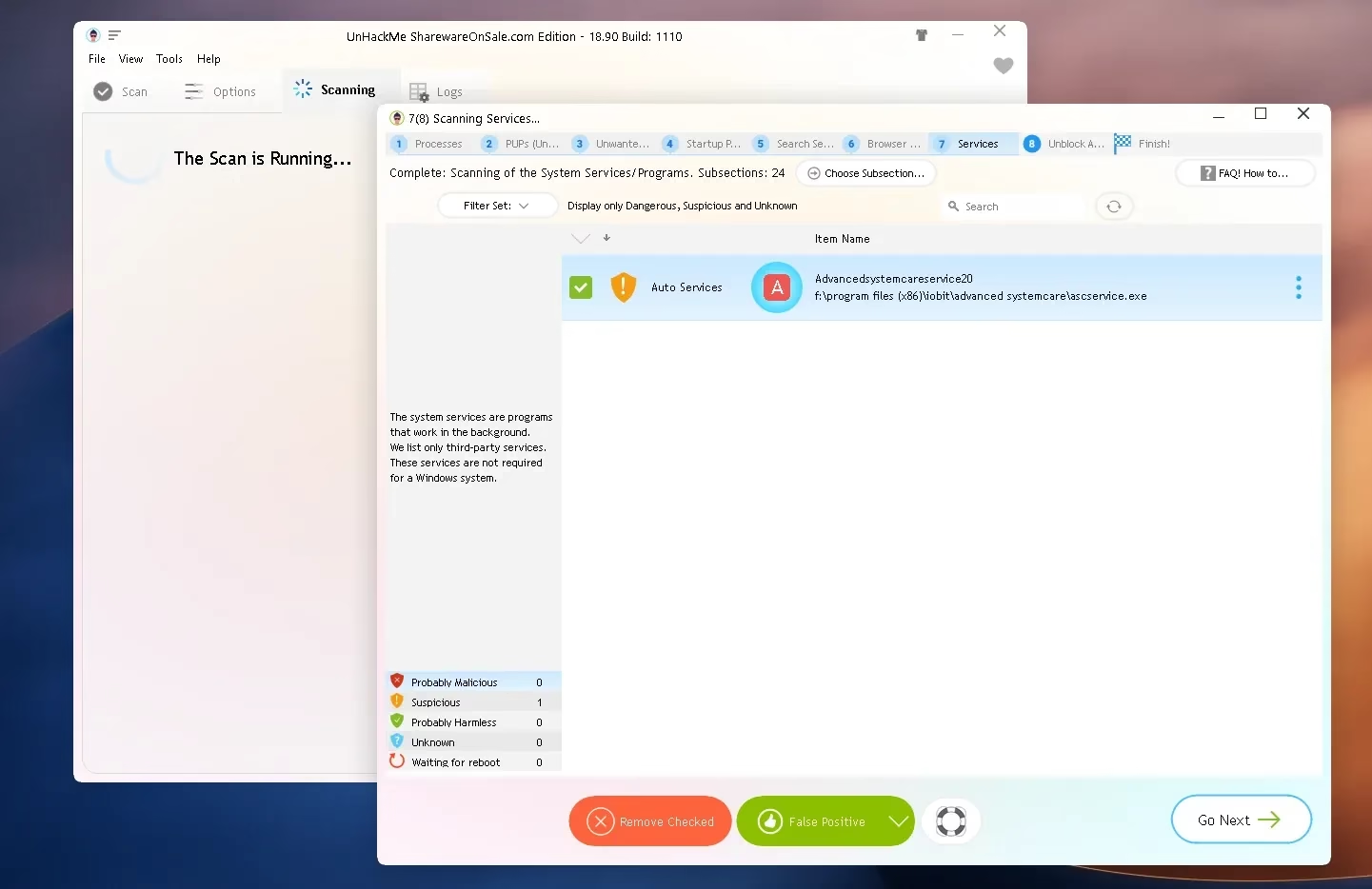
Never remove an item just because you do not recognise it. Check its publisher, file location and purpose first. If you are still unsure, look the entry up or mark it as False Positive rather than removing it — deleting a legitimate Windows service, driver or application component can break things. UnHackMe is an inspection tool, and it expects you to make the final call.
Is UnHackMe safe to use?
The giveaway installer is digitally signed by Greatis Software LLC, the developer, and the download comes from SharewareOnSale’s own server. Greatis reports more than 10 million downloads and shows a 4.8 out of 5 rating from 142 reviews on its website — those are the developer’s own figures, not independent test results. UnHackMe does not take part in the big antivirus lab tests, which is one more reason to run it next to a real-time antivirus instead of in place of one.
It is designed to coexist with other security software. If you need that first layer, see our guides to Bitdefender Antivirus Free and IObit Malware Fighter Pro.
Who should grab it (and who can skip it)
✅ Grab it if your antivirus says the PC is clean but something is plainly off — redirects, pop-ups, a hijacked homepage, unknown startup entries — or if you are the person friends and family hand their slow laptops to. A registered copy with no expiry is a handy thing to keep in the toolbox.
⏭️ Skip it if you want a set-and-forget product with real-time protection and regular program updates. The giveaway build stays at 18.90, and you get the most from UnHackMe when you are willing to read the results yourself.
More free security tools on Techno360
Developer website: greatis.com/unhackme
📊 Our verdict
UnHackMe is a good second opinion for a Windows PC that an antivirus calls clean but that still behaves badly. The UnHackMe free license from this giveaway is quick to claim and has no expiry date, as long as you accept that it stays on version 18.90.
- 👍 Pros: no sign-up, non-expiring licence, seven scan types including boot-time, works alongside any antivirus, you approve every removal
- 👎 Cons: no program updates or support, flags legitimate software at times, monitoring and Network Shield are off until you enable them
Frequently asked questions
Is the UnHackMe 18.90 giveaway really free?
Yes. The UnHackMe free license costs nothing: you download the SharewareOnSale Edition installer and register it with the key above. There is no payment, account or email sign-up.
How long does the UnHackMe free license last?
SharewareOnSale lists it as a lifetime licence for one computer and non-commercial use. It applies to version 18.90 only, with no free updates.
Can I update UnHackMe after activating the giveaway?
It is best not to. The giveaway terms say that updating may make the program unregistered, and the app shows “No upgrade allowed” for giveaway users.
Does UnHackMe replace my antivirus?
No. UnHackMe is an on-demand inspection and removal tool without real-time file scanning. Keep Microsoft Defender or another antivirus running alongside it.
Does it work on Windows 11?
Yes. The giveaway supports Windows 11, 10, 8.1, 8 and 7, in both 32-bit and 64-bit editions.
UnHackMe flagged a program I trust. What should I do?
Select the item and click “False Positive” instead of “Remove Checked”. UnHackMe lists anything it considers suspicious or unknown, and that can include legitimate software.
The UnHackMe free license key is not accepted. Why?
Make sure you installed the giveaway installer from this page and pasted the key with no extra spaces. If it still fails, the offer has most likely ended.