
🎁 V12 GIVEAWAY · OCTOBER 2026 · WINDOWS 10 & 11
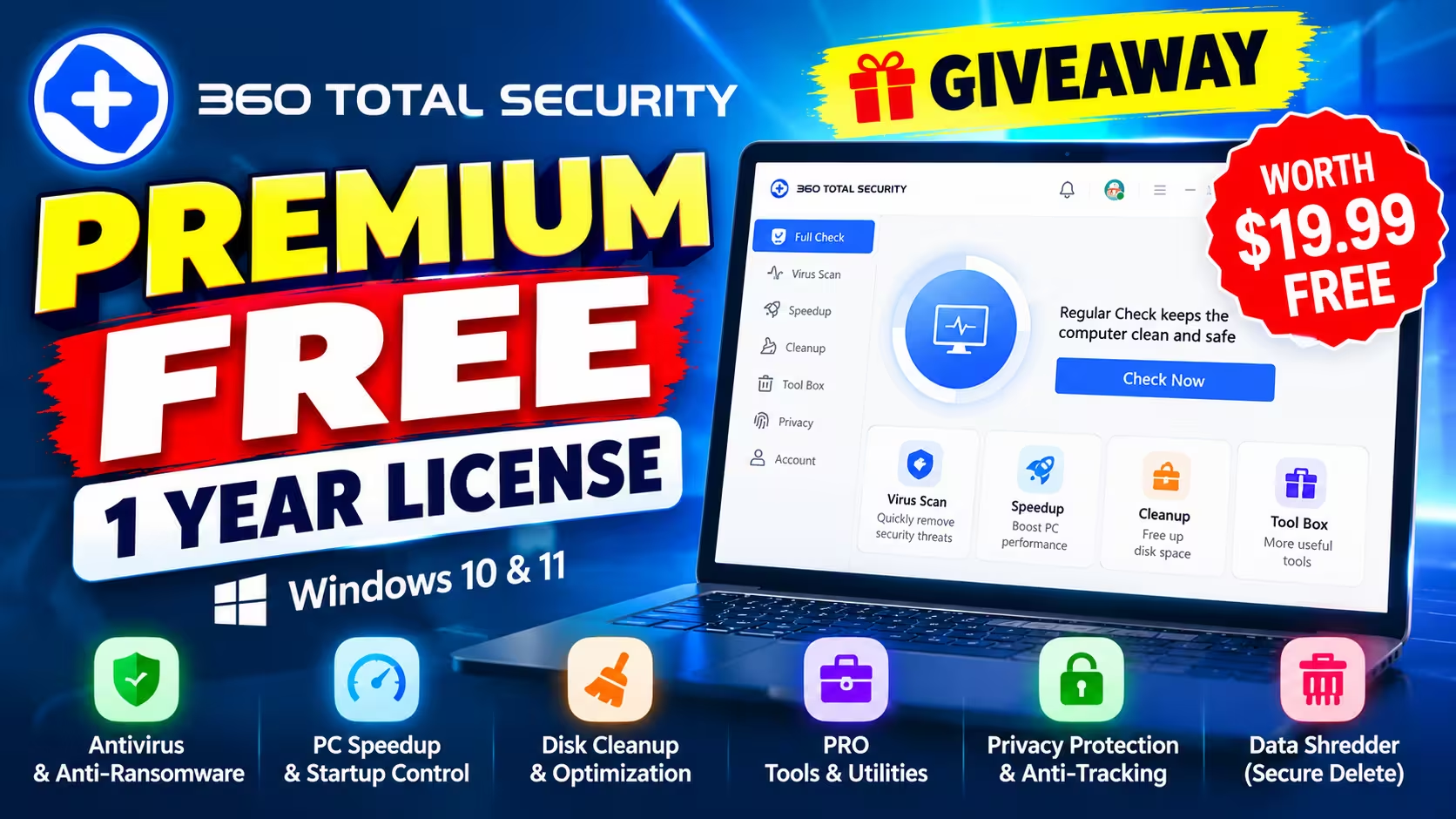
Grab a 1-year 360 Total Security Premium license for free (tested on Windows 11)
No ads, plus the firewall, data shredder, driver updater and every PRO tool in the Tool Box. I activated it on my own PC this morning. Here’s exactly what you get and the one step most people get wrong.
Worth $19.99 1 PC · 1 year Ends ~26 Oct 2026
⚡ Quick Read
- What: a free 360 Total Security Premium license for one Windows PC, valid for 12 months.
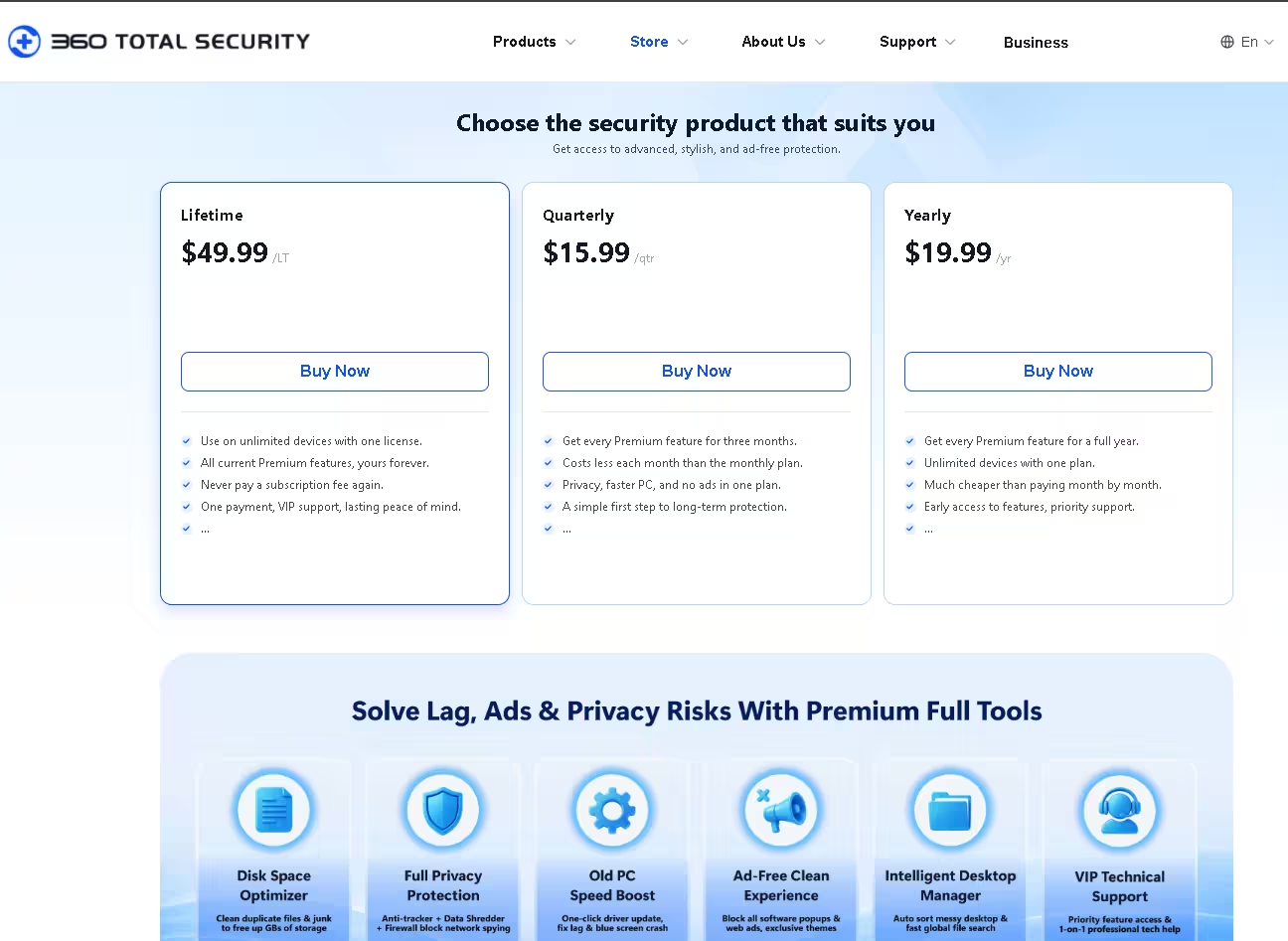
- Normal price: $19.99 a year on the official store.
- Where the code goes: Activity Center → Benefit Activation, not the “Redeem Code” tab.
- Deadline: claim before the giveaway closes, around 12:30 PM IST on 26 October 2026.
- No card: nothing to cancel later. When the year ends, the app simply drops back to the free edition.
If you’ve used the free 360 Total Security for a while, you know the routine: decent protection, plus a steady drip of “Upgrade Now” buttons and orange PRO badges on half the tools. Right now there’s a clean way out. SharewareOnSale is handing out a 360 Total Security Premium free license that runs for a full year, and you don’t have to enter any payment details to get it.
I grabbed an activation code, installed the app from 360’s own site and redeemed it on my Windows 11 machine. The account page now reads Premium Active, EXP: 2027-10-14, exactly one year from the day I activated. Below is what changed, what didn’t, and the screen where the coupon code actually goes (it isn’t where you’d guess).
360 Total Security Premium Free License: Offer at a Glance
| Detail | What you get |
|---|---|
| Product | 360 Total Security Premium |
| Version (per giveaway listing) | v12, the redesigned interface |
| Developer | 360 Total Security (Qihoo 360) |
| Regular price | $19.99 / year |
| Giveaway price | Free |
| License | 1 PC, 1 year from activation, updates and tech support included |
| Supported OS | Windows 10 and Windows 11 (64-bit) |
| Account needed? | Yes, a free 360 account (email or Google sign-up) |
| Region | No region limit mentioned on the giveaway page |
| Giveaway closes | ~26 October 2026, 12:30 PM IST (midnight US Pacific) |
⚠️ The small print: one activation code per computer, it can’t be resold, and it has to be redeemed while the giveaway is still live. There’s no lifetime option here. The paid store sells that separately for $49.99.
What Is 360 Total Security?
360 Total Security is a Windows security and maintenance suite from Qihoo 360. It rolls antivirus, ransomware blocking, web protection, junk cleanup, a startup manager and a pile of small utilities into one window. The free edition has been around for over a decade and still has a big user base, mostly because it covers a lot of ground without costing anything.
The catch with the free version has always been the upsell. Premium removes the ads and switches on the tools marked PRO. This v12 build also has a much cleaner, lighter interface than the old blue-panel design many of us remember.
360 Total Security Premium v12 Features: What You Unlock
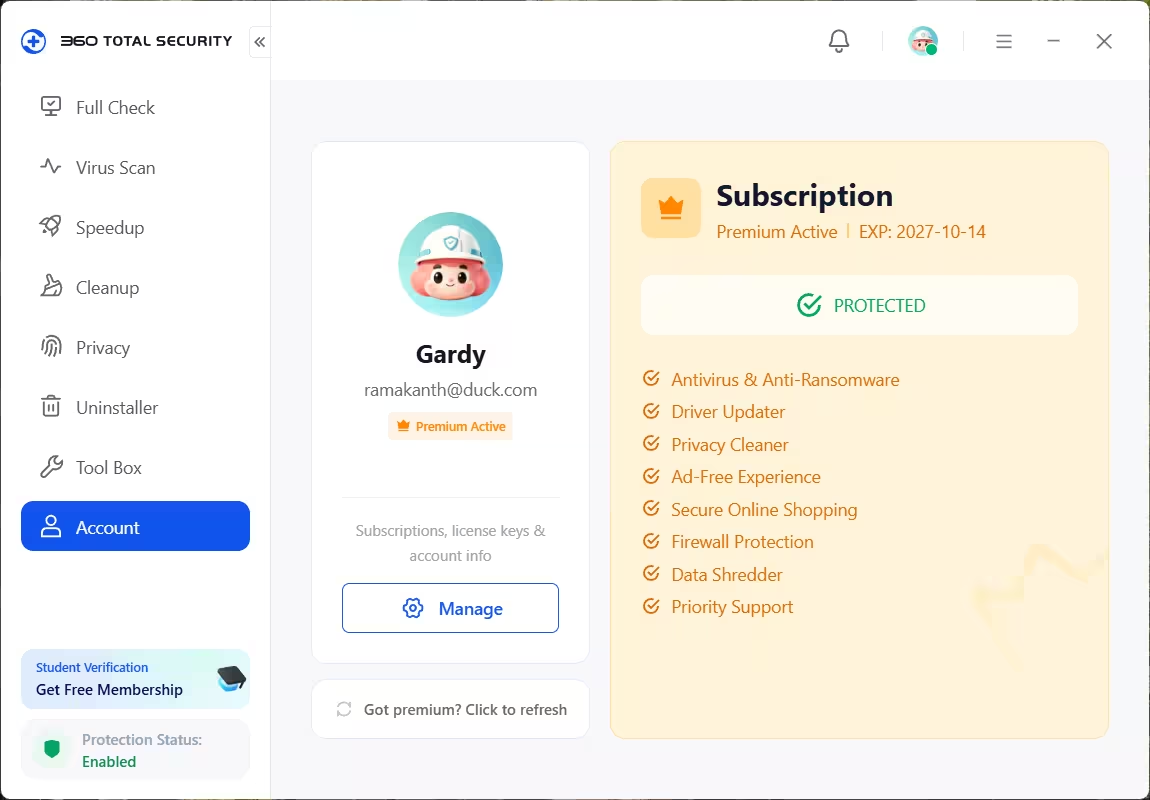
After activation, the Subscription panel lists these as included: antivirus and anti-ransomware, driver updater, privacy cleaner, ad-free experience, secure online shopping, firewall protection, data shredder and priority support. I checked each one on my own install. Here’s how they map to the actual screens.
No more ads or upgrade prompts
For most people this is the real win. The “Upgrade Now” button and the pop-up offers go away. One honest note: a small “Promote 360 / affiliate” card still sat at the bottom of the Full Check screen on my install, so it isn’t a completely promo-free app.
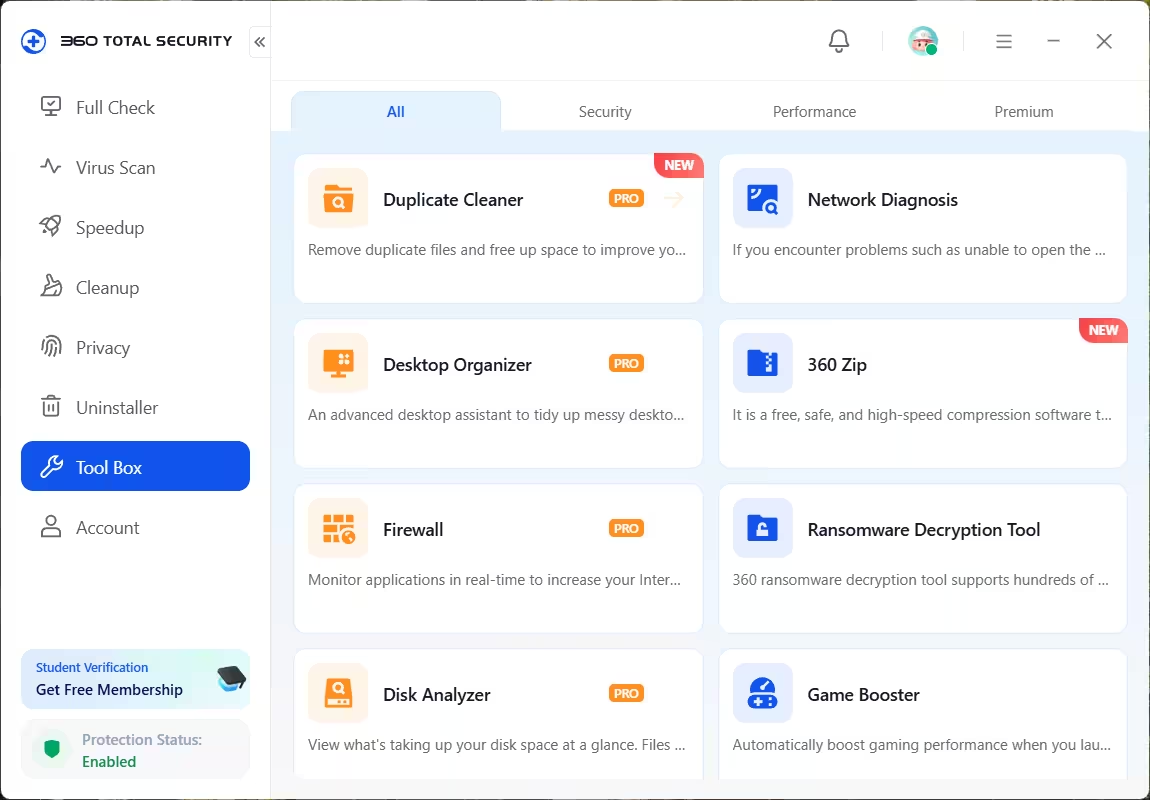
Firewall
Lives in the Tool Box. It watches which programs reach the internet in real time and lets you block the ones you don’t trust.
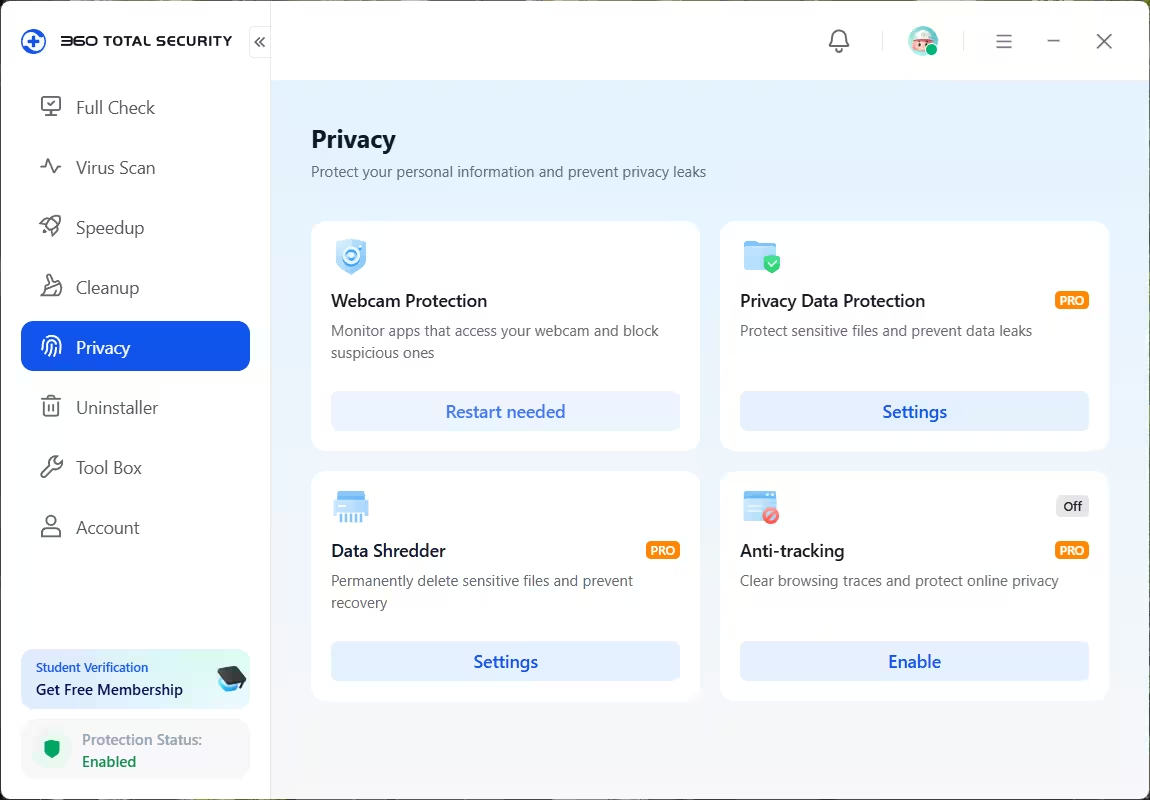
Data Shredder and Anti-tracking
Both sit under the Privacy tab. The shredder overwrites files so recovery tools can’t pull them back, handy before selling an old laptop. Anti-tracking clears browsing traces, but it was switched off by default for me, so flip it on yourself if you want it.
Privacy Data Protection
Guards folders you pick against unwanted access and data leaks. You set it up from its Settings button on the Privacy page.
Duplicate Cleaner, Desktop Organizer and Disk Analyzer
These three PRO utilities are in the Tool Box. Duplicate Cleaner finds copies of the same file, Disk Analyzer shows what’s eating your drive, and Desktop Organizer sorts a cluttered desktop into groups. The Tool Box also has free extras that work with or without Premium, such as Network Diagnosis, 360 Zip, Game Booster and a Ransomware Decryption Tool.
Driver Updater
Checks for outdated drivers and updates them from inside the app. I’d still create a restore point before letting any tool update graphics or chipset drivers.
Speedup and startup control
The Manual tab under Speedup lists everything that launches with Windows. On my machine it flagged a leftover “RobloxPlayerBeta (Invalid)” entry as Should Delete, an orphaned item from an app that was long gone. Useful, and the kind of thing that’s easy to miss in Task Manager.
Scan engines
360 mixes its own engines: 360 Cloud Scan, the QVM II AI engine and KunPeng. Older builds also let you switch on Avira and Bitdefender as optional extra engines. In v12 the engines show up as a row of small icons under the Virus Scan button. The first time I opened that screen, KunPeng downloaded and installed itself in the background.
How to Get the 360 Total Security Premium Free License Key
The whole thing takes about five minutes. In short:
- Claim your free activation code on the SharewareOnSale giveaway page.
- Install 360 Total Security from the official 360 website.
- Sign in or create a free 360 account inside the app.
- Open Account Center → Activity Center → Benefit Activation.
- Paste the code and press Activate Now.
- Confirm the Account tab shows Premium Active.
Here’s each step in detail, with screenshots.
Step 1: Claim your free activation code
Visit the 360 Total Security Premium giveaway on SharewareOnSale. On the “Almost there!” page you’ll see share buttons for Facebook, X, LinkedIn and Bluesky. You don’t need any of them. Click the small text link under them that says you don’t use those networks.

Fill in your email and the other required fields on the short form, then submit it. The code shows on screen, and a copy also lands in your inbox. Save it somewhere safe. It looks like XXXXX-XXXXX-XXXXX.
Step 2: Install from 360’s own website
Skip the installer bundled with the giveaway. Get it straight from the official 360 Total Security page instead. The standard download is a small web installer. If your connection is slow or you’re setting up several PCs, use the offline installer. Run it and click Install.
Already running another antivirus with real-time protection? Turn it off or uninstall it first. Two real-time engines on one PC tend to slow things down and trip over each other.
Step 3: Create a free 360 account (or sign in)
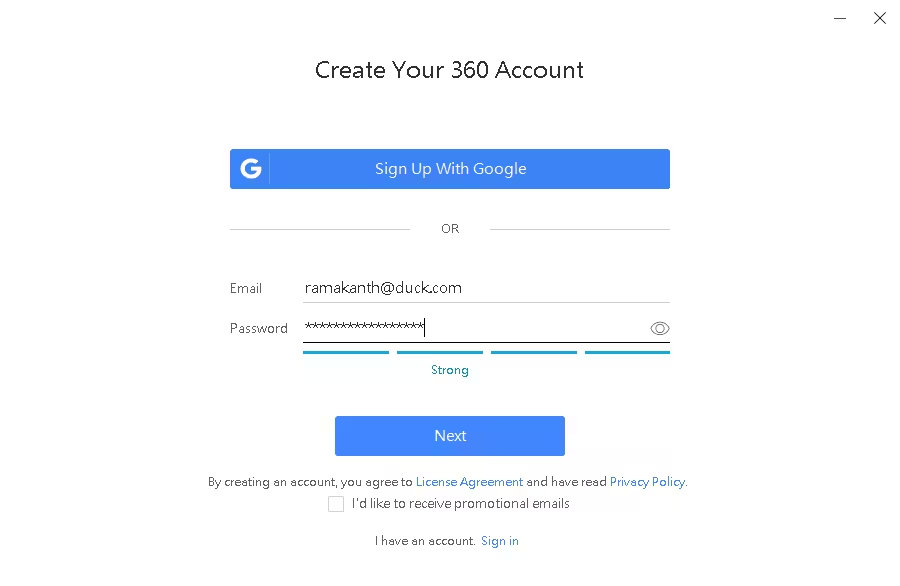
Open the app and click the profile icon at the top. Choose Create account if you’re new, or Sign in if you already have one. You can sign up with Google or with any email and a password. Leave the promotional-emails box unticked unless you want them.
Step 4: Where to Enter the Activation Code (Activity Center → Benefit Activation)
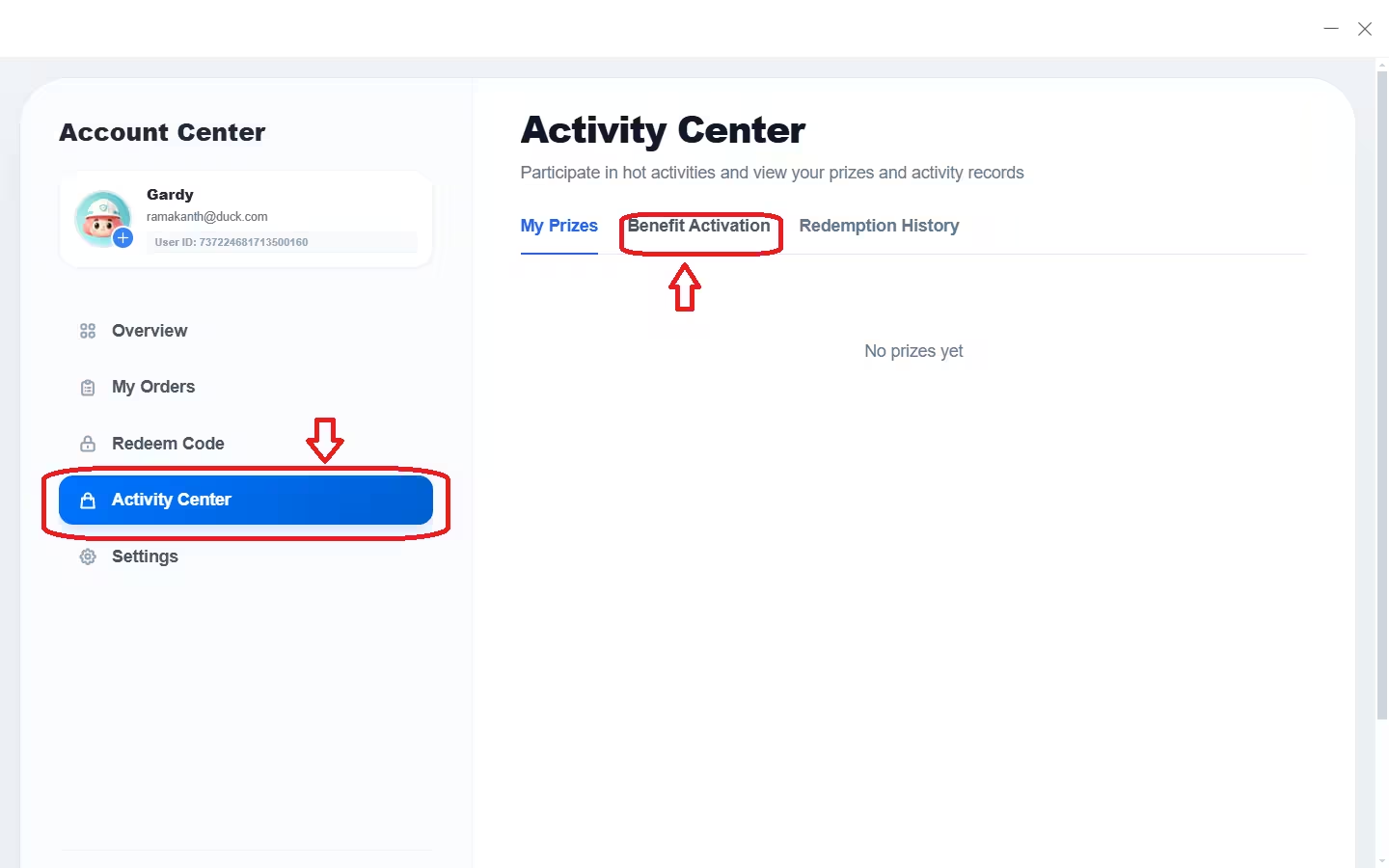
This is where people get stuck. Once you’re logged in, open the Account Center. You’ll see a “Redeem Code” option in the left menu. Ignore it. Click Activity Center instead, then switch to the Benefit Activation tab at the top.
Step 5: Paste the coupon code and activate
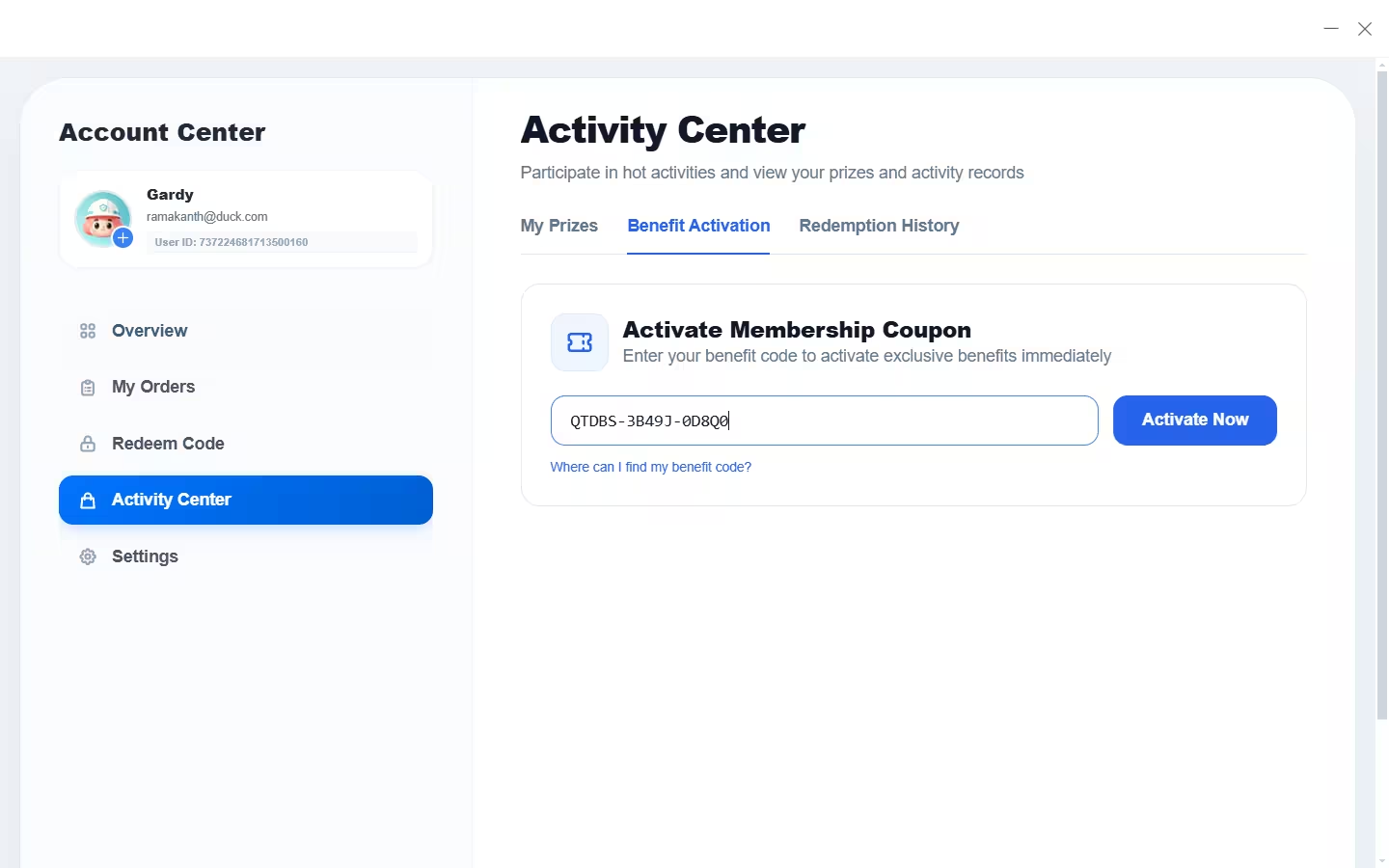
The box is labelled “Activate Membership Coupon”, which is why many people search for a “360 Total Security Premium coupon code”. Your giveaway license key is that coupon. Paste it in and press Activate Now.
Step 6: Confirm Premium is active
Head to the Account tab in the main window. You should see Premium Active and an expiry date one year out. If it still shows the free plan, click “Got premium? Click to refresh”.
A Few Things I Noticed After Activating
- Give the KunPeng engine a minute to finish downloading before you run your first full scan.
- Webcam Protection showed “Restart needed” right after install. Reboot once and everything settles.
- The 12 months start from the moment you activate, not from the day you grab the code. Still, don’t sit on it. It has to be redeemed while the giveaway is open.
- The Premium status is tied to your 360 account, so remember which email you used.
360 Total Security Free vs Premium
| Feature | Free | Premium (this giveaway) |
|---|---|---|
| Antivirus & anti-ransomware | Yes | Yes |
| Full Check, cleanup, startup manager | Yes | Yes |
| Webcam protection | Yes | Yes |
| Ads and upgrade prompts | Yes | Removed |
| Firewall | PRO only | Yes |
| Data Shredder | PRO only | Yes |
| Anti-tracking & Privacy Data Protection | PRO only | Yes |
| Duplicate Cleaner, Disk Analyzer, Desktop Organizer | PRO only | Yes |
| Driver Updater | Listed as a Premium feature | Yes |
| Support | Standard | Priority support |
| Price | Free | $19.99/yr, free with this offer |
System Requirements
- Windows 10 or Windows 11, 64-bit
- Internet connection for install, account sign-up and activation
- Admin rights to install
Pros and Cons
| 👍 Pros | 👎 Cons |
|---|---|
| Gets rid of the constant upgrade nags | One year only, one PC only |
| Firewall, shredder and anti-tracking in one app | A small affiliate promo card still shows on the home screen |
| Startup manager catches broken leftover entries | Activation menu is confusing (Activity Center, not Redeem Code) |
| No card, nothing auto-renews | Needs a 360 account to activate |
📊 Techno360 Verdict: 4.2/5, Worth Grabbing
If you already use the free 360 Total Security, this is a no-brainer. You lose the nags and gain a firewall, a proper file shredder and several handy cleanup tools for a year, without handing over a card.
If you’re happy with Microsoft Defender, think of this as a toolbox upgrade rather than a must-have security switch. Just don’t run both engines in real time at once.
⏰ Missed the giveaway?
These deals close fast. If you landed here after 26 October, try one of these instead:
Or bookmark our free software giveaways hub so you see the next 1-year antivirus license as soon as it drops.
Frequently Asked Questions
Is this 360 Total Security Premium giveaway legit?
Yes. It’s an official promotion listed on SharewareOnSale, and the code is redeemed inside the 360 app’s own Account Center. I activated one myself and the account now shows Premium Active with a one-year expiry.
Where do I enter the 360 Total Security Premium activation code?
Sign in to your 360 account, open Account Center, choose Activity Center, then the Benefit Activation tab. Paste the code and press Activate Now. The separate “Redeem Code” menu is not the right place for this giveaway code.
Is the license key the same as a coupon code or serial key?
Yes. The giveaway sends you one code. 360 calls it a membership coupon, and it does the job of a serial key. Use it in the “Activate Membership Coupon” box.
Do I need a 360 account?
Yes. The Premium status is attached to your account. Sign-up is free with Google or any email address.
How long does the free license last?
One year from the day you activate it, on one PC, with updates and support for that period.
What happens when the year is up?
The app falls back to the free edition. Basic antivirus keeps running, but the ads return and PRO tools like the firewall and shredder lock again. Nothing is charged.
Does it work in India, the UK and the US?
The giveaway page lists no country restrictions, so it should work anywhere. Claim it before the offer ends around 12:30 PM IST on 26 October 2026.
Can I run it alongside Microsoft Defender?
Keep only one real-time antivirus active. When 360’s real-time protection is on, Windows normally takes Defender’s real-time scanning off by itself.
Tested on Windows 11 by Ramakanth, Techno360, on 14 October 2026. This is a time-limited third-party giveaway; terms are as listed on the giveaway page on the date of publishing.