🎁 NEW CODE · UPDATED 18 NOV 2026 · TESTED ON OUR PC
Smart Defrag 12.1 Pro free until 17 February 2027
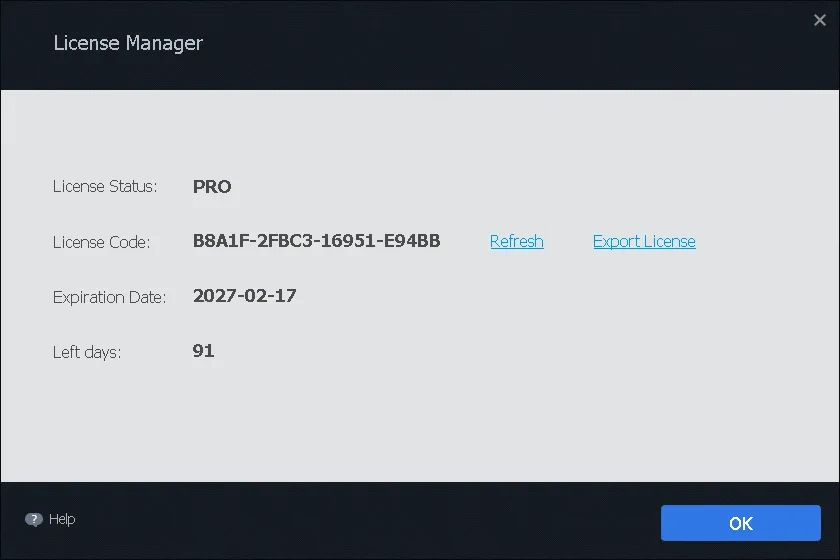
IObit has sent us a fresh promo code for the newest Smart Defrag. We installed version 12.1, pasted the code and the License Manager showed PRO, valid until 2027-02-17. That’s 91 days of Pro, two months longer than our previous code. Here’s how to get the same result in about three minutes.
Version 12.1 Windows 11 / 10 / 8 / 7 15.8 MB installer Pro until 17 Feb 2027
⚡ Quick Read (30 seconds)
- What: Smart Defrag 12.1 Pro, IObit’s disk defragmenter and SSD optimizer for Windows.
- Giveaway: A promo code IObit supplied to Techno360 readers: B8A1F-2FBC3-16951-E94BB
- How: Install the free version, click Enter Code at the bottom-right, paste the code and press Register Now.
- Catch: It’s a time-limited licence, not lifetime. Most of the benefit is on hard drives; SSD-only PCs mainly get TRIM and automation.
- Deadline: Pro runs until 17 February 2027. Jump to the steps ↓
Defragmenting is not as exciting as it was in the Windows XP days. Most new laptops ship with an SSD, and Windows runs its own optimizer in the background. So when IObit’s code for Smart Defrag Pro reached us, the question we wanted answered wasn’t “does it defrag?” It was “does the Pro licence give a normal person anything Windows doesn’t already do?”
We first tested Smart Defrag 12 Pro in September 2026 on a PC with one SSD and two hard drives. On 18 November 2026 we installed the new version 12.1 on a second, all-SSD PC and activated the new code. Everything below comes from those two installs, IObit’s product page and IObit’s official changelog.
🧪 How we tested
- 18 Nov 2026: Smart Defrag 12.1, new giveaway code, PC with three SSDs (C:, D:, E:)
- 27 Sep 2026: Smart Defrag 12.0.0.536, earlier code, PC with 1 SSD (C:) and 2 HDDs (D:, E:)
Disclosure: IObit supplied the promo code. They did not review or approve this article, and nothing here is paid placement.

What Is Smart Defrag Pro, in Plain English?
Smart Defrag is IObit’s disk tidying tool. Over time, files on a hard drive get split into pieces and scattered across the disk, and the drive head has to jump around to read them. The app gathers those pieces back together and moves the files you open most often to the faster area of the disk.
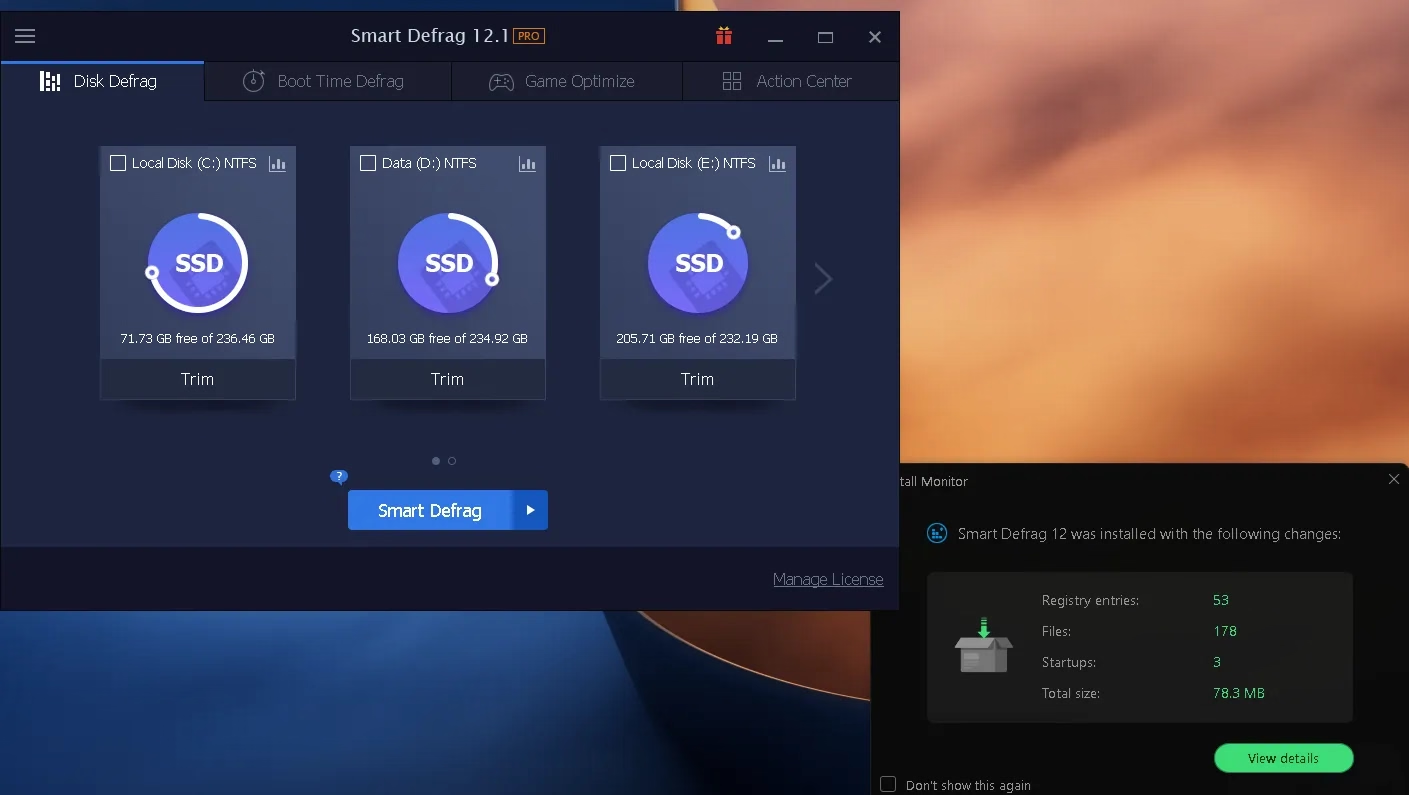
The part people miss is that it treats drive types differently. On both of our test PCs it recognised every SSD and offered only Trim for it, not a full defrag. That’s what you want, because shuffling data around on an SSD only uses up write cycles. Hard drives get the full defrag treatment.

What’s new in Smart Defrag 12.1
IObit released version 12.1.0 on 5 November 2026. According to IObit’s changelog, it brings:
- Smarter Auto Analyze, which IObit says gives more accurate analysis results.
- Optimized Boot Time Defrag to improve startup speed.
- Better compatibility for more stable defragmenting, plus minor bug fixes.
Version 12.0 (25 August 2026) had already introduced a rebuilt defrag engine, a new large-file defrag method, a stronger Disk Cleanup module, 42 interface languages and a built-in lucky draw. Version 11 keeps working: IObit says the move to 12 is optional. Curious how far it has come? Our older Smart Defrag 10 review shows an earlier generation.
Giveaway Terms at a Glance
| Detail | What we found |
|---|---|
| Product | IObit Smart Defrag 12.1 Pro |
| Giveaway code | B8A1F-2FBC3-16951-E94BB |
| Pro valid until | 17 February 2027 (91 days when we activated on 18 Nov 2026) |
| Licence type | Time-limited Pro subscription, 1 PC |
| Account needed | No. Just paste the code in the app |
| Supported Windows | 11, 10, 8.1, 8, 7, Vista, XP (per IObit) |
| Source of code | Supplied by IObit for Techno360 readers |
How to Get Smart Defrag 12.1 Pro Free (Step by Step)
The whole thing takes about three minutes, including the download. One tip before you start: don’t type the code by hand. Copy and paste it. A single swapped 8 and B will give you an “invalid code” error.
Step 1: Download the installer from IObit
Get the setup file straight from the official source. Either button works:
⬇️ Download Smart Defrag 12.1 (15.8 MB) Official product page
Step 2: Install it, and watch the bottom of the setup window
Run the setup file. Before you press Install, look at the bottom of the window. IObit adds two optional offers there, for Advanced SystemCare and IObit Malware Fighter. If you only want the defragmenter, make sure both boxes are unticked.

When setup finishes, Smart Defrag 12.1 opens on the Disk Defrag tab. On our all-SSD test PC it labelled all three drives as SSD and offered Trim for each one. The install monitor running on our PC logged what the installer added: 53 registry entries, 178 files, 3 startup items and 78.3 MB in total. The startup items are what let Smart Defrag run its automatic, background jobs.
Step 3: Paste the giveaway code
Open Smart Defrag. The title bar says FREE. At the bottom-right, just under the orange Activate Now button, there’s a small Enter Code link. Click it, paste the code below into the License Code field and press Register Now.
SMART DEFRAG 12.1 PRO · GIVEAWAY CODE
B8A1F-2FBC3-16951-E94BB
Pro until 17 February 2027 · Click the code once to select it, then copy
You should see “The license code has been activated successfully.” Click OK and you’re done.

Step 4: Check your expiry date
Click Manage License at the bottom-right of the main window. Ours showed License Status: PRO, an expiry date of 2027-02-17 and 91 days left (see the screenshot at the top of this article). If yours shows the same date, the code worked. Fewer days left is normal if you activate later, because IObit’s earlier promo code ended on a fixed date too.
⚠️ Code not working?
- Copy and paste it again, and make sure there’s no extra space at either end.
- Make sure you’re on version 12.1 (download it again from the button above).
- Promo codes can reach an activation limit or be withdrawn by IObit. If it stops working, tell us in the comments and we’ll check.
What the Pro Licence Actually Adds
The free edition handles basic defragmentation and Game Optimize. Here’s what IObit keeps for Pro, based on its official comparison chart:
| Feature | Free | Pro |
|---|---|---|
| Standard file defrag | ✅ | ✅ |
| Game Optimize | ✅ | ✅ |
| Automatic defrag while the PC is idle | — | ✅ |
| Deep defrag and large-file optimization | — | ✅ |
| Boot-time defrag of registry and chosen files | — | ✅ |
| Frequently used file placement | — | ✅ |
| Auto updates and priority support | — | ✅ |
Boot Time Defrag: the most useful Pro feature
While Windows is running, it locks files such as the page file, the MFT and the registry, so no normal defragmenter can touch them. Smart Defrag gets around that by running before Windows finishes loading. Version 12.1 also optimizes this feature to improve startup speed, according to IObit.
The tab has five checkboxes. Page/hibernation files, the MFT and system files are available to everyone. Registry files and specified files carry an orange PRO badge, and the giveaway code unlocks both. Boot Time Defrag is off by default, which we like: switch it on only when you need it, because a boot-time pass adds a few minutes to that one startup.

Game Optimize: handy if your games live on a hard drive
On our first test PC, Smart Defrag found three installed games automatically: Age of Empires III (3.70 GB), Cities: Skylines (listed as Cities.exe, 16.16 GB) and Need for Speed Underground (1.69 GB). You can add others with the + tile. Pressing Optimize pulls each game’s files together on the disk.
If your games already sit on an NVMe SSD, don’t expect a difference you can feel. This matters most for large games on a spinning hard drive, where load-time stutter often comes from the disk hunting for scattered files.

Disk Health: useful, but check it on your own drive
The menu also has a Disk Health panel that tracks response time, read/write speed and SMART data. On our SSD it showed response time and write speed, but temperature and the SMART table came up empty (N/A). That can depend on the drive and controller, so your results may differ. If drive health is your main concern, a dedicated tool like Kerish Disk Health goes much deeper.

Is Smart Defrag Safe to Use?
We downloaded the installer only from IObit’s own CDN, and it installed and ran normally on both test PCs. Three things to keep in mind:
- Bundled offers: setup offers two other IObit products. Untick them if you don’t want them.
- Background activity: setup added 3 startup items on our PC. That’s how automatic defrag works, so expect it to do some work in the background while your PC is idle.
- SSDs are handled safely: SSDs get Trim, not a full defrag, so the app doesn’t waste write cycles.
Who Should Grab This (and Who Can Skip It)
| 👍 Good fit | 👎 Can skip |
|---|---|
| Desktops or older laptops with a hard drive | SSD-only laptops: Windows already handles Trim |
| Gamers with a large game library on an HDD | People who already run another optimizer suite (IObit itself advises against running several at once) |
| Anyone who wants defrag to run on its own while the PC is idle | Anyone who needs a licence that lasts beyond February 2027 |
| Old PCs: IObit says it runs on as little as 256 MB RAM | Users who don’t want extra startup items |
More Free Disk Tools on Techno360
✔ CODE ACTIVATED & TESTED · 18 NOV 2026
Our Verdict: A Useful Free Upgrade, Especially for HDD Users
Smart Defrag 12.1 does the sensible things. It spots SSDs and trims them instead of defragmenting, runs quietly in the background and keeps the interface to a few clear tabs. The new code gives you Pro until 17 February 2027, which unlocks boot-time registry defrag and hands-off automatic optimization: the two features most relevant to anyone still using a hard drive. On an SSD-only PC, the gain is small.
| 👍 What we liked | 👎 Watch out for |
|---|---|
| SSD vs HDD detection worked right away on both PCs | Pro ends 17 Feb 2027; it’s not lifetime |
| Activation took seconds, no account needed | Bundled offers in the installer |
| Boot-time defrag reaches files Windows locks | Adds 3 startup items; Disk Health showed N/A on our SSD |
Frequently Asked Questions
Is Smart Defrag 12.1 Pro free?
Smart Defrag has a free edition anyone can download. Pro is a paid subscription, but with the giveaway code B8A1F-2FBC3-16951-E94BB you get Pro features at no cost until 17 February 2027.
How long does the giveaway licence last?
Our License Manager showed an expiry date of 17 February 2027, with 91 days left when we activated on 18 November 2026. Activate early to get the most time.
I used your earlier Smart Defrag code. Should I use the new one?
The earlier code ran until 20 December 2026. The new code lasts until 17 February 2027. Use Enter Code or Manage License in the app to add it. We haven’t tested whether it replaces or extends an active licence, so check the date in Manage License afterwards.
What’s new in Smart Defrag 12.1?
According to IObit, version 12.1.0 (released 5 November 2026) improves Auto Analyze, optimizes Boot Time Defrag for faster startup, improves compatibility and fixes minor bugs.
Is it safe to use Smart Defrag on an SSD?
Yes. The app detects SSDs and runs Trim on them instead of a traditional defrag, which avoids unnecessary writes. On both of our test PCs, SSDs only showed a Trim option.
Does Smart Defrag work on Windows 11?
Yes. IObit lists support for Windows 11, 10, 8.1, 8, 7, Vista and XP.
The code says invalid. What now?
Copy and paste it instead of typing it, and make sure there’s no extra space at either end. Promo codes can also reach an activation limit or be withdrawn by IObit. If it stops working, let us know in the comments.
🎁 Love free licences? We post new ones every week. Browse the full collection in our Free Software Giveaways & License Keys hub and bookmark it so you don’t miss the next one.
Tested and written by Ramakanth, Techno360. Updated 18 November 2026 with a new IObit giveaway code and Smart Defrag 12.1 screenshots. Version history is from IObit’s official changelog; feature details are from IObit’s product page and may change.